One of the great ironies of phishing is that, these days, identity theft via the web tends to work by preying on people’s fear of identity theft. It doesn’t help that most people don’t really understand the technology. The typical phishing message looks something like this:

Dear so-and-so. In order for us to protect your account from identity theft, we need you to give us all the critical information that we already have. Otherwise, your account will be locked.

These typically use actual bank logos and link to a website that imitates the bank’s real site as closely as possible. The days of “Pease entr yore acccccount infomation hear KTHXBYE” are long gone.

But the one I saw in the spamtraps today was just astonishing in its brazen use of buzzwords to add authenticity:

Dear Wilmington Trust Banking Member,

Due to the high number of fraud attempts and phishing scams, it has been decided to implement EV SSL Certification on this Internet Banking website.

First we have the scare tactic (always ironic in a “there are treacherous people about” sense). Throwing in EV SSL certificates makes it seem a bit more authoritative, since it’s something a lot of companies have started doing, and people may have heard about it in the news.

The use of EV SSL certification works with high security Web browsers to clearly identify whether the site belongs to the company or is another site imitating that company’s site.

It has been introduced to protect our clients against phishing and other online fraudulent activities. Since most Internet related crimes rely on false identity, WTDirect went through a rigorous validation process that meets the Extended Validation guidelines.

And here they talk about EV certs and how much safer they’ll make your account!

Please Update your account to the new EV SSL certification by Clicking here.

And here’s where they demonstrate that they figure the typical mark doesn’t actually have a clue what EV SSL certificates are. Various real businesses have converted from standard SSL to Extended Validation SSL, and the users didn’t have to do a thing.

Now, you might need to upgrade your web browser or switch to one that will show you a green bar (Firefox 3, IE7, Opera 9, etc.), but you’d still be able to access your account even if you didn’t. Unless the site started blocking other browsers like PayPal briefly discussed back in April. Even then, there would still be nothing that would require you to log into your account and make a change.

Anyway, let’s continue:

Please enter your User ID and Password and then click Go.

This one’s presumably a simple phish, just obtaining login credentials to give the thief access to the account through the web.

(Failure to verify account details correctly will lead to account suspension)

And of course the implied threat: Do this or you won’t be able to get at your money. Again, a typical phishing tactic.

On a side note: My favorite spam topic of the last week is “Refinance your ARM today.”. Yeah, I know what ARM stands for, but I keep imagining Cyborg, or perhaps the Six Million-Dollar Man, trying to refi a loan that covers the gadgets in his arm.
Waaay back in the dark ages of the Web (somewhere between 1994 and 1997) I discovered a weekly email newsletter called “This Is True.” It collected strange-but-true news stories from around the world, summarizing each in a short paragraph with a witty one-liner at the end. I subscribed to the free edition, and later to the full version, which had about twice as many stories. I even picked up a few of the books collecting past stories (at a con, I think, but I can’t remember which con).

Eventually I got too busy to read them, and the back-issues piled up unread, and I decided to let my subscription lapse. But earlier this year, I decided to re-up with the shorter, free version, and it’s still as good as ever.

This week’s issue included a disappointing story: even though they practice — in fact, probably helped originate — responsible list management, Yahoo is blocking them as spammers. Why? Because people are signing up for the list, then deciding they don’t want it anymore, and instead of unsubscribing, hitting the “Report as Spam” button. Yahoo has apparently taken those spam reports at face value, and blocked everyone’s copy of the newsletter.

Clearly, some people are unclear on what “spam” means. It’s not just “mail I don’t want.” It’s mass mail I don’t want and didn’t ask for.”

That, and I’m sure some people don’t realize that their reports are being used to train everyone’s filters. I remember a co-worker explaining a few years ago that he’d trained Gmail to send the SourceForge newsletters (or something similar) straight into his spam folder. I commented that they might be using that data to train their sitewide filters, and he said something like, “I hope not.”

Using user feedback to train sitewide or network-wide (such as Cloudmark, or Akismet) filters is a powerful technique. Some people will catch the leading edge of a spam attack, and that data can be used to protect others as the attack continues. Some will check their mail sooner, and that data can be used to re-filter messages that have been received, but not yet viewed.

Unfortunately, it also can give a lot of power to people who are either unclear on the criteria being used or have an axe to grind, unless you include measures to (a) contain the impact or (b) keep track of each reporter’s reliability. I know Cloudmark factors in the reporter’s reputation, for instance. And I suspect that AOL does, at least in some cases, limit measures such as blocking to specific recipients, but I can’t be certain.

Anyway, to summarize:

  • Use the Report Spam button responsibly.  If you actually subscribed to it, it isn’t spam unless they refuse to remove you from the list.
  • Check out This is True.  You may laugh, you may groan, you may think, or you may get pissed off at the world — or all of the above.  It’s certainly worth a look.

(I really should have finished writing this yesterday, before someone submitted the original story to Slashdot. Posting about it to get the word out seems kind of redundant now. Heck, now that I think about it, I should have submitted the original to Slashdot. Oh, well.

Wow… you know gas is expensive when the spammers start hawking gas cards.

Our support contact address received a message touting “Finest List of Nurses Including Email Addresses – Free $50 Gas Card” I had to wonder what the heck it was, so I took a look at the message. They were trying to sell “sales leads” — i.e. names and contact information — of nurses, and were offering to throw in the gas card if you spent enough on “leads” to do your own spamming.

Following up on the PayPal anti-phishing discussion of a few weeks ago, I see that PayPal is promoting a service called Iconix. You install the program on your system, and it looks at your inbox for messages that claim to be from one of its customers. It tries to verify them “using industry-standard authentication technologies such as Sender ID and DomainKeys.” Messages that pass get a lock-and-checkbox icon attached to the sender’s name, and in some cases the name is replaced by the sender’s logo.

On the tech side, it’s similar to SpamAssassin’s whitelist_from_spf and whitelist_from_dkim features. Both allow you to specify a sender to whitelist, and it will only give a message special treatment if it can verify the sender.

On the user-interface side, it’s similar to EC certificates, in that it tries to highlight a “good” class of messages rather than flag or filter out a “bad” class.

It’s not a bad idea, actually, and now that I’m surprised I haven’t seen something similar in other email clients. It’s sort of like setting up custom rings or images for images on your cell phone address book

They seem to be focused on webmail and Outlook so far, and only on Windows, but it looks like the perfect candidate for a Thunderbird extension. They do have a sign-up form to notify you when they add support for various programs and OSes, and I was pleased to see not only Thunderbird and Mac OS listed, but Linux as well. Too often, Linux gets forgotten in the shuffle to ensure compatibility with every Windows variation.

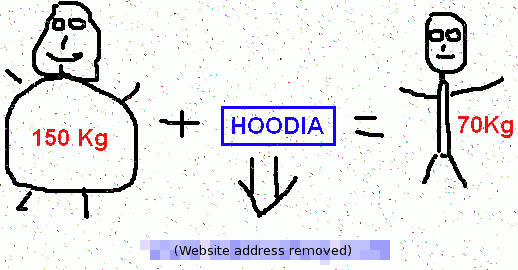
I don’t think I’ve seen this one in the wild, but variations pop up on Spam Or Not from time to time.

I’ve obscured the website address, though I’m sure it’s been replaced by now.

Seriously, how can you look at the combination of poorly-drawn not-quite stick figures (probably done with a mouse in Microsoft Paint) with the visual equation demonstrating the supposed effects of a diet supplement and not laugh?

Edit: I’ve realized why I haven’t seen these in the wild: We use the MSRBL-Images signatures in our spam filter, and that list is built using ratings from Spam Or Not.

Edit 2: Both the filter signatures and the rating site seem to be gone now, so a little background: MSRBL-Images was a list of hashes that could be used to identify images that were repeatedly used in spam. Spam or Not, inspired by the infamous Hot or Not site, was their way of crowdsourcing the data. The site would show an image that had been collected, and you could mark it as spam or not, and some threshold or percentage of spam ratings would cause the hash to go into their signature list.

»All pages site-wide with this tag