On the Blaugust Discord, UltrViolet suggested that bloggers link their post titles to the permalinks so that it’s easy to just right-click, “Copy Link as Markdown,” and get a formatted link with the correct title. (I’ve noticed Orion includes this in its context menu, and there are extensions for Firefox and Chrome that add it.)

I’ve been using the publication date in the post footer as the permalink on all the 11ty-generated parts of my site since I first converted the Les Mis blog back in 2021. But I can’t remember why I made that decision. I’m 99% certain every WordPress theme I’ve used has linked the title (even this one, which links from the timestamp too). It wasn’t an example in eleventy-base-blog either.

My best guess is that I was just implementing the Fediverse’s convention of linking the timestamp to the permalink. But that’s almost certainly because all the Twitterlike services don’t have titles.

But in looking up linking conventions, I went down an interesting rabbit hole about rel="bookmark".

Anyway, it’s an obvious change for better usability, and I’ll be updating my templates ASAP. (Edit: it’s done!)

Blaugust 2026: My Posts

Sure, I like electronic gadgets. But I dislike planned obsolescence more.

It’s one thing when the newer model really is that much better. “All About the Pentiums” exaggerated it, but computer hardware in the 1990s really was improving by leaps and bounds. (And the software was devouring those performance gains, both in demanding more resources, and being less efficient as programmers were told to optimize for their own time, not for disk space or RAM.) That eventually settled out around the time smartphones and cloud computing started taking off, which is why I was able to run a 2012 model CPU all the way through 2024. A faster PC would have been nice, but I didn’t need one yet.

As I recall the tech industry freaked out when demand for new PCs dropped. There was probably a rash of “Millennials are killing computers!” articles.

But smartphones were going through the same kind of rapid improvement. You could easily justify buying a new phone after only two years: it was a lot faster, had a better display, had a better camera and more storage, and so on. And the carriers were happy to hand you a “free” new device to keep you on their service. Heck, if you really wanted (and could afford) to buy a new phone every year, you could make a case for it.

In that environment, you could kind of accept a company only offering 2-3 years of support for their phones.

Eventually that settled out too, and it takes longer for new phones to really be worth the upgrade. Of course the industry has tried to keep the pace going. If the hardware still works, and it’s still able to run the apps people want to use, there’s no good reason for the company to stop supporting it after only three. Especially with something whose main purpose is to be constantly connected to the Internet.

I have an Android phone from 2020 and a tablet from 2019. The tablet still works fine. (It’s great for digital comics, or PDFs that are pre-formatted for 8.5×11″ pages.) The phone worked until two days ago. (Technically it still does, but I don’t want to overload the already-swollen battery.) But they’re both unsupported. Not because the hardware has failed (up until Monday). Not, like the Poke3, because they can’t handle today’s apps. Simply because Google and Samsung don’t want to provide updates anymore. Not even bugfixes. Not even security fixes.

It’s maddening.

Especially with prices on new electronics skyrocketing due to the AI datacenter-driven RAMpocalypse.

There are many things I dislike about Microsoft, but I appreciate that they finally realized that a large chunk of their customer base can’t or won’t upgrade their hardware just to install Windows 11, no matter how they try to convince us, and has extended Windows 10 support twice with minimal hoops to jump through.

The Fairphone 4 (2021) that I pressed into service to replace the dying Pixel 5 (2020) is more or less comparable in terms of speed. I still need to experiment with the camera. But it’s still supported through 2028, meaning it’s safer to use online. Which, again, is what cell phones are for.

Blaugust 2026: My Posts

I had a migraine this morning that really threw me for a loop. Then I spent the afternoon and evening dealing with a different kind of headache: getting my phone number transferred to a new(ish) phone.

We picked up a Fairphone 4 a few years ago as sort of a hedge in case the electronics industry and/or tariffs and/or international trade went bonkers and one of our phones died. (We weren’t expecting all three.) The teenager used it for a bit before we bought him a phone that was closer to what he actually wanted to use. So the Fairphone returned to the back bench, so to speak.

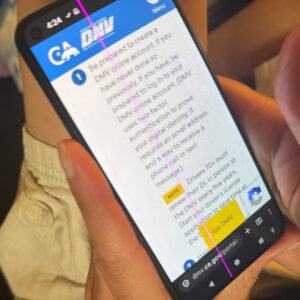
A cell phone held in a hand, showing the California DMV website. A bright magenta line is running vertically down the entire screen, including the status bar at the top and the onscreen buttons at the bottom.Today, a bright vertical magenta line appeared on my Pixel 5’s screen. I’d noticed it was running hot lately, and when I pulled it out of the case, sure enough it had started bulging.

I know it’s old. I’ve been trying to get as much use out of it as I can, which, well, I guess I have.

(Edit: added photo)

I do not like spicy pillows, Sam I Am.

So I reset the Fairphone and started setting up the most important apps: authenticator, password manager, stuff like that. And I set about unlocking the SIM protection on my phone number and got ready to call customer service.

I knew from experience that the Fairphone 4 works fine on T-Mobile’s US network, but their apps don’t know how to activate the e-sim. So I was prepared to talk someone through.

But because we’d been swapping back and forth between phones, the sim was still registered as attached to the teen’s number, even though the number is actually pointing to his current phone. It took over two hours (at least 45 minutes of that on hold) and three levels of escalation to first figure out that’s what the problem was, and then find someone with the access to fix it.

They did finally get it all sorted out, but it was not the way I wanted to spend my afternoon.

(And when I let the old phone cool off, the screen went back to normal, though it’s still bulging.)

Edge-on view of the phone showing that the glass screen is splitting away from the plastic case.

And to top it off, Nextcloud’s photo uploading has stopped working reliably, so I have to go through the last couple months of photos and make sure I have everything copied over. I went through some of them tonight, and need to get the rest…soon.

For now, I’ve turned the old phone off completely overnight.

Once I’ve got the photos transferred, I should figure out whether it’s worth repurposing the device with a new battery or just running it without one. And then dispose of the fire hazard.

Blaugust 2026: My Posts

I know, I’m already doing 100 Days To Offload. And I’m on track! I’ve written 24 posts in the last two months, so I’m actually ahead! But a few days ago I found out about Blaugust, a challenge to publish daily and/or write 31 posts in the month of August.

I can’t resist the wordplay in the name!

100 Days doesn’t have any set themes, and Blaugust’s themes are optional. And apparently it’s a fairly laid-back challenge, so if I miss a day I don’t need to drop out.

So what the heck: I’ll aim for 31 posts this month and see how far I get.

Besides, it’ll help motivate me to catch up on book reviews.

As with 100 Days, for Blaugust I intend to include any new or substantially rewritten page on my site, not just the ones that show up here in the reverse-chronological feed. The way I see it, what matters is less the specifics of what counts as a blog, and more that I’m writing new stuff on a regular basis and putting it out there on my own website, not on corporate social media.

Time to start my Blaugust post list:

  1. This post.
  2. Legends of Amberland (game review)
  3. First the Migraine, Then the Headache
  4. FairEmail (app review)
  5. Grumbling about Planned Obsolescence
  6. Where to Put Your Permalink
  7. What is rel="bookmark"?
  8. TIL about Hybrid MBR/GUID Partitions
  9. Starfleet vs. Jean Valjean?
  10. The Prestige
  11. Eulogy for the Pixel 5
  12. Canon Camera Connect
  13. To Each This World (book review)
  14. Reusing the Sign: Com-On-Inn

I recently added “Your LLM was trained on my blog” to the intro on my home page. I’m sort of being facetious, but it’s also true: my old site (hyperborea.org) has been in the Common Crawl data set for years, this blog has been online since 2002, and the major LLMs have used Common Crawl’s data in their training.

Way back when I switched to WordPress in 2003, one of the things I found annoying about it was that it would auto-convert punctuation from ASCII to “fancy” characters. Curly quotes, curly apostrophes, em-dashes instead of double-hyphens, ellipses…These were things that bugged the heck out of me when I saw them in broken emails and Word documents. Over the next year, seeing the difference it made in legibility, I came to appreciate real typography. Since then I’ve been happy to let WordPress, and later ClassicPress and Eleventy convert my plain typing.

Side note: I still have trouble using some apps with code snippets (ex: Apple Notes and Stickies), ’cause I haven’t figured out how to stop them from converting ASCII punctuation that means something in the code to Unicode punctuation that means something more specific in printed human language. Also, notice in that sentence that ClassicPress was smart enough to convert a straight up and down apostrophe used on a contraction to a curly apostrophe, and not to a curly single quote like it does with ‘here.’

Anyway, WordPress powers a huge amount of the web. I’ve seen stats bandied about such as 42% of all websites, 60% of content management systems, >50% of the top 10,000 websites (by some measure or another). The exact numbers aren’t important, it’s just important to know that a whole lot of the web uses WordPress to convert what people write into HTML pages for the web.

Now let’s get back to LLMs:

  • People think they can identify LLM-generated text because it tends to include em-dashes.
  • LLMs were trained on writing by actual people on the web.
  • A whole lot of that writing by actual people is presented by WordPress.
  • WordPress has auto-converted typography including em-dashes since 2003.
  • That means a large chunk of LLMs’ training data includes text by real people that uses real em-dashes.

“AI” doesn’t use em-dashes because real people don’t, it uses em-dashes because real people do [note: lots of swearing] (via).

The only place I can imagine it would be even a semi-reliable indicator would be in social media posts, on platforms where that kind of auto-conversion doesn’t happen. Even then, I can easily imagine someone writing a draft in Word, or copying a sentence or two from their WordPress post, or just hitting option+shift+hyphen on a Mac (or whatever the key combo is on Windows).

I remember a brief period shortly after Instagram introduced in-feed advertisements when I was getting mostly travel ads that consisted of well-composed scenic landscapes and cityscapes and sponsored nature photos. Which…well, was fine! They blended in with all the scenic and nature photographers I was following! I almost hit “like” on a few!

Back in 2017, I wasn’t sure whether to be disturbed, or to look at it in terms of XKCD’s idea of constructive spambots. (Mission accomplished? Maybe, but looking back from today, that’s basically what “generative AI” does, and it turns out it’s still disturbing.)

It’s probably the only time I’ve come close to appreciating targeted advertising. It was possible to use just context and not full behavioral surveillance, and it actually surfaced something worth seeing.

That said, I never clicked through to arrange a trip through any of the posts. Apparently, it was ineffective across the board, because as I mentioned, that period was brief. (Targeted advertising doesn’t work as well as its proponents claim, and oh how I wish it hadn’t become the standard method of paying for online services.)

By 2019 I was seeing big box stores and fast food, crackers and cold medicine, movie posters, brand logos and slogans. They weren’t even trying. It was fully Facebook-ified, they were mining as much of my data as they possibly could, and this was the best they could do? Plus, by then they’d also tweaked the feed algorithm to push more ads, more sponsored posts, more allegedly-popular posts instead of the pictures from friends and photographers I wanted to see. In short, it no longer sparked joy.

Instagram had the chance to be like a magazine, with ads that at least align with the content, but the more Facebook tried to monetize it, the more jarring and blatant the ads became, and the more they were based on what Facebook thinks it knows about you instead of trying to fit with your actual interests based on what’s posted by the people you’re following.

That’s around the time I mostly shifted to Pixelfed for casual photo sharing. I cross-posted for a while, but eventually deleted my account after leaving it unused for several years. Since then I’ve moved from Pixelfed to a compatible self-hosted site.

From what I’ve read, Instagram has continued to double-down on shoveling ads/sponsored content/influencers (now with more AI!) since then. I haven’t felt like dipping my toe back in. Though I have on occasion tried to visit some local business’ online presence only to discover that all they have is an Instagram account…which I can’t see because Instagram hates the open web (and always has, even before Facebook bought them).

And yet I’m still on Flickr. As much as it lost its way during the Yahoo years, it never stopped being about the photos.

I’m considering starting the 100 Days To Offload challenge to post 100 times to my personal blog over the next year. I’m going to include any new posts I make on my personal website, including the tech tips and reviews sections (which is where I’ve mostly been writing these days). I could mirror those posts over here, but that seems kind of silly, since they all show up in my main site’s feed anyway. (They’ll also get combined in the sitewide 100daysToOffload tag list.)

It’s been a while since I did one of these challenges. A long while: The last one was probably when I tried to do NaBloPoMo in 2018 (blog daily during November, sort of a companion challenge to NaNoWriMo) and dropped it after a few days. This one’s longer, but it’s a lot more flexible.

Though I am curious: across my whole website, how many posts have I made over the past year? Only nine on K2R (counting the update round-up, but not counting the individual posts I’ve updated), but it turns out I’ve written 96 reviews since May 23 last year (which is a lot more than I realized!) and 14 troubleshooting articles. So I guess I’ve got a decent shot at hitting 100 again!

»All pages site-wide with this tag