Sure, I like electronic gadgets. But I dislike planned obsolescence more.

It’s one thing when the newer model really is that much better. “All About the Pentiums” exaggerated it, but computer hardware in the 1990s really was improving by leaps and bounds. (And the software was devouring those performance gains, both in demanding more resources, and being less efficient as programmers were told to optimize for their own time, not for disk space or RAM.) That eventually settled out around the time smartphones and cloud computing started taking off, which is why I was able to run a 2012 model CPU all the way through 2024. A faster PC would have been nice, but I didn’t need one yet.

As I recall the tech industry freaked out when demand for new PCs dropped. There was probably a rash of “Millennials are killing computers!” articles.

But smartphones were going through the same kind of rapid improvement. You could easily justify buying a new phone after only two years: it was a lot faster, had a better display, had a better camera and more storage, and so on. And the carriers were happy to hand you a “free” new device to keep you on their service. Heck, if you really wanted (and could afford) to buy a new phone every year, you could make a case for it.

In that environment, you could kind of accept a company only offering 2-3 years of support for their phones.

Eventually that settled out too, and it takes longer for new phones to really be worth the upgrade. Of course the industry has tried to keep the pace going. If the hardware still works, and it’s still able to run the apps people want to use, there’s no good reason for the company to stop supporting it after only three. Especially with something whose main purpose is to be constantly connected to the Internet.

I have an Android phone from 2020 and a tablet from 2019. The tablet still works fine. (It’s great for digital comics, or PDFs that are pre-formatted for 8.5×11″ pages.) The phone worked until two days ago. (Technically it still does, but I don’t want to overload the already-swollen battery.) But they’re both unsupported. Not because the hardware has failed (up until Monday). Not, like the Poke3, because they can’t handle today’s apps. Simply because Google and Samsung don’t want to provide updates anymore. Not even bugfixes. Not even security fixes.

It’s maddening.

Especially with prices on new electronics skyrocketing due to the AI datacenter-driven RAMpocalypse.

There are many things I dislike about Microsoft, but I appreciate that they finally realized that a large chunk of their customer base can’t or won’t upgrade their hardware just to install Windows 11, no matter how they try to convince us, and has extended Windows 10 support twice with minimal hoops to jump through.

The Fairphone 4 (2021) that I pressed into service to replace the dying Pixel 5 (2020) is more or less comparable in terms of speed. I still need to experiment with the camera. But it’s still supported through 2028, meaning it’s safer to use online. Which, again, is what cell phones are for.

Blaugust 2026: My Posts

The kid has been watching a zillion teardown/repair/dismantling videos of various devices on YouTube, and wants to learn to repair phones.

So I took the old phones and tablet that I’d set aside for e-waste collection, and the tools I used to do battery replacements on a couple of devices a while back, and let him at them.

He disassembled and reassembled the dead Nexus 5x that got stuck bootlooping two years ago. Plugged it in. Waited.

It actually powered on enough for us to get it into recovery mode!

Unfortunately I should have left it in fastboot mode, because now that I’ve downloaded an image to install, I can’t get it to power up again at all.

Nexus 7

The Nexus 7 Android tablet has been discontinued in favor of the Nexus 9. (via Slashdot.) I’ve had a Nexus 7 (2012) almost since the beginning, and while it’s showing its age, I’ve been trying to stretch out its lifetime, because I actually do still use it on a regular basis.

Most of what I do these days with it is reading. Email. Books. Comics. Feedly. Pocket. Some photo management and searching. My four-year-old plays games, most of which run fine once they’re up but they take forever to load. I’ve also started introducing him to photo editing apps like Pixlr and Aviary. I used to do more typing and web browsing on it, but it’s just gotten so slow that it’s actually faster to pull out my phone or go over to a computer. Katie doesn’t use it much at all because she has a Note, which is almost into tablet territory already. (She’s not alone. Since the iPhone 6S came out, Pocket has noticed that people with both tablets and phones use their tablets a lot less often if their phones are larger.)

But the 7″ tablet form factor is perfect to keep with you at the breakfast or lunch table, or kick back on the couch.

The thing to remember about the Nexus 7 is that the original release was a proof of concept. There were android tablets before, but the market was still considered something of a joke compared to the iPad, and Google wanted to prove that (a) there was a market for a good Android tablet, and (b) there was a market for a tablet larger than a phone and smaller than an iPad. The iPad Mini didn’t exist at the time, and Apple was still ridiculing the concept.

It succeeded. But they made some mistakes with the hardware that were corrected in the 2013 model. Unfortunately those mistakes have made the first edition notorious for slowing down.

Mine was getting close to unusable around the time Lollipop was released, and upgrading finished the job. Fortunately wiping it and doing a fresh install cleared up a lot of the problems, though as I’ve added more apps, it’s continued to slow down. Chrome is too slow to use, and while Firefox is a little faster, I basically can’t surf the web on the tablet anymore.

But for a core set of apps, it’s still useful. I’ll read/reply to email and skim Feedly in the morning at breakfast, saving items to Pocket to read later. Then at lunch I may read a book or catch up on those saved articles. Since Gmail and Pocket both work offline and sync in the background, I can still use them in places without WiFi. Mobile data would be nice, but offline+sync makes it less critical, and I’ve saved a few hundred over the last three years by not having an extra data plan.

I am going to have to replace it soon, but I can’t decide what with. I don’t want the larger size that the Nexus line is moving toward, and while I’ve been looking at Samsung’s Galaxy tablets, the models I’ve tried all feel a little too small or a bit too big. I don’t want a 10″ tablet, and I don’t want a giant phone. I want a device that’s just big enough to read a full comic book page on it, but still small enough that it feels like a paperback book.

Note: I didn’t actually post this when I wrote it. I’ve backdated it to the original date because it’s no longer timely, but I wanted it online so I could link to it.

Nexus 7

I’ve been using desktop computers most of my life, laptops since my teens, a smartphone for about four years and a Nexus 7 tablet for about two months. I’m starting to get a sense of where the tablet fits in my overall computer usage, and with the release of the iPad Mini and upgraded Nexus 7 models, I figured it was time to write about it.

One thing I’ve found interesting is that, all other things being equal, I’d almost always prefer using the tablet to my smartphone for anything that takes longer than a minute. What makes the smartphone great is that it’s ultra-portable. If I’m running errands or anything else, I just put it in my pocket and forget about it. I walk around normally, and it’s there when I need it to check messages, post a status update, moderate comments, check directions, pull up a grocery list, take a picture, or yes, make or take a phone call.

But if I’m going to sit down for 10 minutes or more to read, to reply to email, to blog, or really much of anything else, I’d rather use the tablet. It’s easier to read. It’s easier to see things at a glance. Websites designed for desktop use work better since the screen is bigger. Apps are easier to use on the tablet than the phone, at least those designed to take advantage of it. The 7″ tablet is a great size for reading, just a little wider than a paperback book, easy to hold up while on the couch, in bed, at a table, or anywhere else.

I’m a lot faster at typing on the tablet than on the phone, and it’s certainly easier to compose when you can see more of what you’re writing. One downside of a 7″ tablet rather than a 10″: The keyboard takes up a lot of screen space in landscape mode, which is the mode I type fastest in because of my years typing on real keyboards.

When we were on vacation for 10 days, I used the Nexus 7 heavily. The only times I fired up the laptop were for photo management (this seems to be a recurring theme) and for one round of blogging.

As far as the tablet vs. the desktop, I like the tablet because I can so easily take it anywhere in the house. It’s the way to get through a morning’s email, Facebook, and news site rounds while eating breakfast. I can lie on the couch (well, in theory), kick back in the easy chair, prop myself up in bed — anywhere. I’m not tied to my desk, or to the places I can set a laptop, and I don’t have close it and wake it up again if I want to move to another room.

The main obstacle I find to using the tablet at home is that my almost-2-year old son loves using it himself to play games, read interactive kids’ books, and watch videos. We limit his time, but whenever I pick it up, it reminds him it’s here, and we have to go through another round of “Not now.” and “Ninja!” and “No, I’m using this right now, you’ve already had plenty of time on it tonight” before he decides he’s happy going back to his toys or books (which of course he wants me to read to him now…)

A desktop is still better for some tasks, though. A full (or at least laptop) sized physical keyboard trumps a virtual keyboard for serious writing or especially editing, whether it’s text or code. (A mouse makes editing a lot easier. I keep fat-fingering when trying to use a touchscreen to select & rearrange text, and I’m a lot slower with a touchpad than an actual mouse.) I’m still trying out image editors on Android. And of course there’s the storage factor: you can always plug another hard drive into your desktop to store more photos (or music, or video, or raw images, or…), but mobile devices are a lot more limited. (No, I haven’t migrated all my personal data to the cloud.)

Even with web applications and cross-platform services that offer mobile apps, there are a lot of sites that haven’t quite figured out how to tell a tablet from a smartphone, or that leave out functionality in their mobile apps. For example: until a couple of weeks ago, you couldn’t manage a Google+ page using the Android app (and you still can’t with the mobile-optimized website as far as I know), and even now it’s kind of clunky: you have to sign out and sign back in as the page.

So there you have it: One data point of how a 7″ tablet gets used in real life. It’s different enough from a smartphone that it’s worth having both, though I can’t really compare usage of the 7″ and 10″ form factors. That said, having the smaller tablet, I don’t really feel a need for a larger one.

Update: Something that came up in the Google+ discussion is connectivity. The model I have is wi-fi only, which was a calculated trade-off at the time, but is basically my only regret when it comes to buying the Nexus 7. It works great where wi-fi is available (home, office, coffee shops, hotel lobbies), and I can use my phone as a mobile hotspot where it isn’t…but that drains the battery, and it means fiddling with an extra device, waiting for it to start up, etc. Of course, now Google has a Nexus 7 with mobile data access, so if I were buying it today, that’s what I’d get.

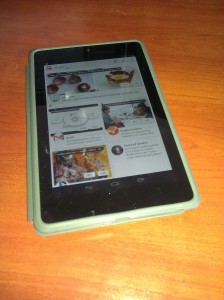
Nexus 7 Tablet in caseSo, I’ve joined the tablet generation. I recently bought a Nexus 7, Google’s latest 7″ tablet.  Here are some first impressions.
Performance is very nice. The games I’d played on my (almost two-year-old) phone are much snappier, plus of course the bigger screen helps a lot.

Within minutes I was typing a lot faster than on my phone, at least when holding it horizontally. Downsides: It’s easy to hit the menu buttons while trying to hit the space bar. Editing is a pain. I miss having arrow keys or a trackball.

The screen size and resolution are just inside the edge of being able to read a full page of a comic book without resorting to guided view. This will change as I get older, but tech will no doubt improve, and I may end up using a larger tablet in the future. I just wish comiXology’s app made it easier to locate comics I’ve already purchased and want to download.

Backup/restore pulled in all my WiFi settings from my phone, which was convenient.

A tablet is much nicer for catching up on news/email/Facebook at breakfast than a phone. Or a desktop or laptop, for that matter. It’s also nice if you drop in at Coffee Bean to relax for a half hour.

My toddler loves the tablet. A few days ago while I set up his breakfast, he grabbed it off the table, set it on the floor, opened the cover, and tried tapping on the screen to wake it up. So far I’ve let him play Fruit Ninja and a couple of interactive kids’ books. He doesn’t quite have the coordination to avoid the edge of the screen, though, so he keeps bringing up a search or dropping back to the home screen while he’s trying to play. I need to find an app to temporarily lock in the running app, so that (a) he won’t get too frustrated and (b) I can look away for 30 seconds and not worry that he’ll end up clicking on an ad for something.

Reading a novel in ordinary indoor light was just fine, and comparable to reading on a Kindle 2. It’s not that great in bright sunlight, though.

Book Navigation on the Google Play Reader takes some getting used to. I’m reading Year Zero, which has a lot of footnotes. You can tap the number to jump to the note, but I kept missing it, or missing the link back to the source. And then trying to return, I’d accidentally tap the slider, jumping forward 1/3 of the way through the book, and reflexively hit the Back button, which doesn’t go back to where you left off, but goes back to the home screen. By the second chapter, I’d stopped reading the footnotes as I got to them and figured I’d just read them when I got to the end of the chapter, which of course removes them entirely from context.

I don’t really mind not having a camera (except the front-facing one for conferencing), because it’s a bit bulky for a camera if I’m not going to get the benefit of actual optics out of it, and I usually have a phone or actual camera anyway.

I am sort of regretting that it’s Wi-Fi only, though, because intermittent access does limit things a bit. Anything you’ve already downloaded is fine, of course, but Google Docs Drive is virtually useless without a connection. I definitely need to look for some sort of local word processing app for writing offline notes. On the plus side, it reconnects automatically to remembered networks, and Gmail at least seems to sync immediately — both with incoming and outgoing mail, so you can read, compose and “send” offline, and new messages will go out as soon as you’re back in WiFi range. (Also, I don’t have to add another $25/30 monthly data plan on top of both our phones.)

Overall, I’m liking it a lot. It’s great for casual reading, communication, and games, and it looks like it’ll work well for writing. I need to look for a decent image editor and offline word processor, and fix a few issues with my WordPress install (I’m using a CDN tool on this site that doesn’t play nicely with image uploads from the mobile app), and I think it’ll be great for travel as well.

Update: Nothing to do with the tablet itself, but I can’t believe WordPress’ Android app still has the bug where if you upload a draft, it pre-fills the publication date so that the post ends up being back-dated when you finally finish it.

So, Google has announced the Nexus One phone. Let’s see how it stacks up against what I want in my next phone:

  • Mainstream Android (i.e., not overcustomized like Motoblur)? Check.
  • Faster than what I’ve got (a G1)? Check.
  • More memory & storage? Check.
  • Better camera? Check.
  • Longer battery life? Check.
  • Less clunky? Check.
  • Available on my current provider? Check.

Sounds great!

Only one problem: there’s no keyboard. Android’s on-screen keyboard is decent enough, but I’m not quite ready to give up that physical keyboard just yet. (OTOH, I don’t want the Droid. I played with the keyboard a little at Best Buy a couple of weeks ago, and really didn’t like it.)

I’ll have to practice with the virtual keyboard on the G1 some more. If I can get used to it, this might be worth the upgrade.

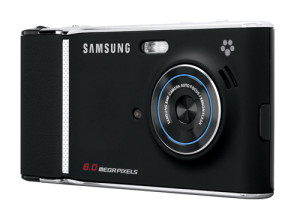
*sigh* I’m mostly happy with my G1, but I just read about the upcoming Samsung Memoir, which is the first phone I’ve seen that really takes the approach I’ve been looking for in terms of photo capability: instead of a phone that’s also a camera, it’s a camera that’s also a phone. Even the press release describes it as “designed to look and feel like a customer’s current point-and-shoot digital camera.”

Memoir cameraphone

Key specs:

  • 8 Megapixel camera
  • Flash
  • 16x Digital Zoom
  • Touch screen
  • 5 shooting modes
  • 3G connection
  • Connects to Flickr and other photo sharing sites
  • GPS navigation

It quotes Samsung’s Bill Ogle as saying, “This is the camera phone that will make people want to leave their digital camera at home” — which is exactly what I want from a camera phone.  It’s what I’ve wanted in a camera phone for years, and now that I finally bought a new phone, now someone’s actually selling one.

On top of that, it’s being offered by T-Mobile, so I’d be able to get it at an upgrade price — or could have if I hadn’t just upgraded to a G1 three months ago!

Of course, the press release leaves out a couple of critical items:

  • No mention of optical zoom
  • No mention of mobile web browsing capabilities
  • No mention of extensibility
  • No specs on how much memory it has, or what kind of card it takes (probably the usual micro-SD)
  • No Wifi

I’ve come to really appreciate the G1’s fully-capable web browser and the Android market for third-party apps, and I’d be reluctant to give that up. If the Memoir is a camera first and a phone second, the G1 is a handheld computer first. As for zoom, I have yet to see a digital zoom that was any better than just cropping an image in Photoshop.  And even with a 3G network, I’ve found it does take time to upload the G1’s 2-megapixel images. For 8 megapixels, I’d really want wi-fi.

Ah, well.  With phones, as with many things, you have to take the plunge sometime, or you’ll keep waiting for the next model, and the next, and the next, never actually make any change at all.

»All pages site-wide with this tag