
I recently saw an ad for a restaurant called Pizza Shack:

Is Radio Hut far behind?
I recently saw an ad for a restaurant called Pizza Shack:
Is Radio Hut far behind?
I picked up a new mouse to use at work yesterday, mainly because I wanted a scroll wheel that actually turned. (The old one was jammed.) I figured I’d go optical as well, since I much prefer optical mice. I ended up getting a basic $15 Microsoft mouse, though I would have gone for a more expensive Logitech if I were getting one for home.
When I plugged it in this morning, I was surprised to find that it skipped all over the place. Not constantly, as if the KVM had gotten its signal mixed up, but enough that it would be a real pain to use. (Oddly, it worked more smoothly on my Linux box than the Windows box. I have no idea why.)
So I pulled out the manual, looking for a troubleshooting section. Something like “If your mouse skips, it may be caused by XYZ.” Nothing. The contents were:
Useful information to be sure, but not quite what I was looking for.
As it turns out, I just tossed away my mouse pad and tried the mouse directly on the desk. It works like a charm now. I guess the pad was too reflective or something.
I’m sure you’ve seen the bumper stickers that read:
Visualize World Peace
and the parodies that read:
Visualize Whirled Peas
…but we saw a new one this morning:
Visualize Grilled Cheese
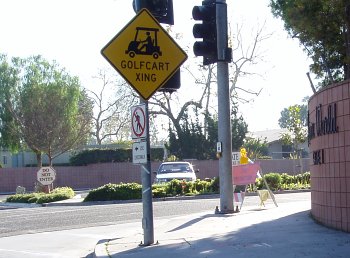
Yes, this is on a city street.

Spotted in the dust on the back of a truck:

Okaaay…

Coming soon, the next exciting chapter in the Myst saga, it’s…

Okay, maybe not…