Netcraft reports on a series of malicious banner ads using a vulnerability in Internet Explorer 6 to spread the Bofra virus. Clicking on the banners sends you to a website that uses the recently-discovered IFRAME vulnerability to infect your computer. Of note are the facts that there is no patch for this yet, and XP SP2 is affected (whoops, I misread that part).

The Register found the ads on their own website and identified the source as ad server Falk AG. They have pulled Falk AG’s ads from their rotation and apologized to their readers. Netcraft adds that Falk AG’s clients include high-profile sites such as A&E, NBC, and Sony. The ad company has issued a statement, but the page currently consists of the line “Server Engine: Application error.”

Update 3pm: The statement from Falk [archive.org] is readable now. Apparently someone broke into one of their network load balancers and reconfigured it to redirect ads to the malicious site. Once they discovered it, they shut down the affected system and started checking the rest. The malicious ads ran for a total of about 6 hours on Saturday.

Update Tuesday: the Internet Storm Center has posted a write-up of the attack response.

Of course, there are several ways to protect yourself from this type of attack.

Browse Happy. Online. Worry-free. Switch today.

I had to reboot one of the Windows servers on Thursday, at which point the GDI+ checker installed by Tuesday’s security fix popped up a message explaining that there was still some software with the JPEG vulnerability. OK, fine, I’ll run it again and see what’s missing. So I clicked on, well, OK, and it pulled up Internet Explorer.

More to the point, it pulled up Internet Explorer 2.0.

You see, that machine has some leftover files from a previous OS, and somehow the GDI+ utility picked up on that copy of iexplore.exe. Of course, it could barely handle the vulnerability info page — no ActiveX of course, and it even displayed raw JavaScript code at the top of the page because it wasn’t hidden inside a comment! (Even Lynx can handle that now!)

But once I fired up IE6 to actually run the test, I figured as long as I had the old one running, why not check a few site layouts? Or some browser sniffers, and see what it claimed and what it could handle?

Almost nothing, as it turns out. It couldn’t even find any of the sites I tried. And from the way it couldn’t find them, I realized exactly what was missing: it couldn’t handle virtual hosts. Continue reading
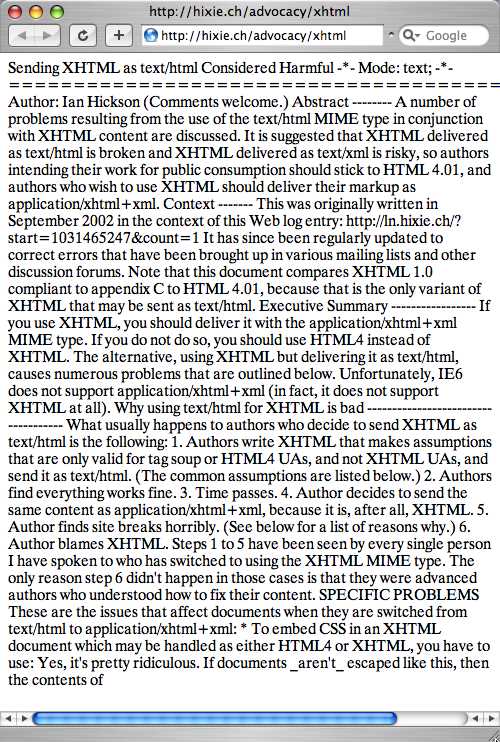
Via Weblog about Markup & Style:

Dive Into Mark provides an excellent example of why a browser shouldn’t second-guess file types.

Safari content sniffing for XHTML

It’s a screenshot of Safari looking at a text document… but the first line mentions XHTML, so it’s decided that’s what it must be. I’ve had lots of trouble with Internet Explorer doing the same thing, and Safari’s been aiming at bug-for-bug compatibility in order to “break” as few sites as possible.

[Edit: After the source blog was taken down, I grabbed the screenshot from archive.org and uploaded it here.)

Well, it’s official. After months of rumors and vague announcements, Netscape 7.2 has been released!

It’s been just over a year since AOL closed down Netscape and spun off the independent Mozilla Foundation. Despite the uncertainty of that transition, no one can deny that Mozilla has flourished. People everywhere are switching to Firefox and recommending it on security, usability, and capability grounds.

It’s really quite surprising, particularly since Netscape the company no longer exists. But Mozilla has been marching ahead, and all that stood between AOL and an updated Netscape was updating their proprietary features, like the AIM sidebar and access to AOL email, to work with the new Mozilla code.

For the past year, I’ve been advocating that people switch from Netscape to Mozilla, since it seemed the best upgrade path. (Someone on Mozillazine pointed out that AOL is actually promoting the Mozilla connection — an interesting switch.) I’ve been skeptical about the new version actually materializing, but here it is.

I’m going to stick with Firefox myself, but for Netscape fans and those looking for the full browser suite (complete with AIM/ICQ)…

  • Download Netscape 7.2

Great. Just great. Now there are ad networks using banners to install malware.

The article from Netcraft goes on to say that some phishing attacks are using banners to install keystroke loggers and other spyware. So now, just by using an insecure browser* to click on the link in a message claiming to be from your bank can make it possible for hackers to steal your passwords, credit card numbers, etc., even if you realize the site’s a scam and don’t fill in the form. Fun, fun, fun!

Time to look into those alternative browsers again…

* Yes, security holes have been found in Mozilla, Opera, etc. With the rise in popularity of Firefox, some attackers are starting to target Mozilla. But aside from looking at the sheer number of holes in IE compared to other browsers, just about everyone seems to have a better track record at fixing vulnerabilities than Microsoft does.

Some people browse collections. I collect browsers. Mostly I just want to see what they’ll do to my web site, but I have a positively ridiculous number of web browsers installed on my Linux and Windows computers at work and at home, and I’ve installed a half-dozen extra browsers on our PowerBook.

One project I’ve worked on since my days at UCI was a script to identify a web browser. In theory this should be simple, since every browser sends its name along when it requests a page. In practice, it’s not, because there’s no standard way to describe that identity.

Actually, that’s not quite true. There is a standard (described in the specs for HTTP 1.0 and 1.1: RFC 1945 and RFC 2068), but for reasons I’ll get into later, it’s not adequate for more than the basics, and even those have been subverted. That standard says a browser (or, in the broader sense, a “user agent,” since search robots, downloaders, news readers, proxies, and other programs might access a site) should identify itself in the following format:

  • Name/version more-details

Additional details often include the operating system or platform the browser is running on, and sometimes the language.

Now here are some examples of what browsers call themselves: Continue reading

ยปAll pages site-wide with this tag