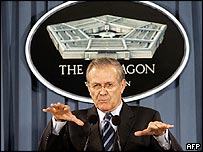
The BBC has posted an interesting article on the US Military’s plans for Internet operations. But that’s not what I want to write about here. What I want to write about is this accompanying photo of Secretary of Defense Donald Rumsfeld:

AFP photo of Donald Rumsfeld holding his hands out.

The article mentions that messages put out for psychological operations in foreign markets are making their way back to American audiences. I’m not sure this photo qualifies as PsyOps, but I think it does qualify for a caption contest.*

Please post your suggestions in the comments.

(via Slashdot)

*OK, you won’t win anything, but with luck the other entries will make you laugh.

I found a 419 scam in the spamtraps that started, in typical fashion, with an all-caps name and address, then the line:

HIGHLY CONFIDENTIAL REQUESTING

What made this funny (aside from the bad grammar) was the fact that the To: line contained over 1,200 addresses!

Ah, this is obviously some strange use of the word confidential that I wasn’t previously aware of!

I handle the abuse contact for an ISP’s domain name. Normally this doesn’t take up much of my inbox. Even the “Your users are spamming” messages (in response to forged senders) have dropped off.

Since last night, though, the abuse and tech support contacts that filter into my inbox have collected 42 44 spams advertising the “Body Bouncer,” which claims to “take the gravity out of sex.”* Distributed IPs, random content, 6 different subjects (so far). What they have in common are a sales pitch in an image, and a link to their website.

Ordinarily, that would be enough to tag it. Continue reading

I had a really strange experience with Internet Explorer earlier this week. I had a reason to check Windows Update (checking for driver updates), but no matter what I did, Microsoft Update opened itself in Firefox! Even if I typed the URL into IE, or chose it from the Tools menu. It became clear that the same was true of typing in any other URL, or trying to open a link in a new window.

As far as I can tell, IE had decided that it wasn’t capable of handling new HTTP connections and was sending the URL to the default browser. Continue reading

Here’s a piece of friendly advice from a mail server admin to companies that interact with subscribers and customers via email:

Pick one domain name for your business. Just one. Don’t use any other domains in your emails, even if you want to keep order confirmations separate from promotions. If you contract out for some other company to send out a newsletter or survey to your customers, insist that they send it out using your own domain name. If you’re using DomainKeys or SPF, make sure they’re authorized or send it yourself. And don’t even think of making the links through redirection scripts, even if you really want to track which subscribers are clicking.

Why?

Two words: Spam and fraud. Continue reading

Posting an Opera button on your website or blog is a great way to encourage people to try out the browser — but what if the visitor already uses Opera? It shows solidarity, but what if you could show them something else, something that is new to them?

You might want to replace your regular Opera banner with an ad for Opera Mini. Or show them another graphic of your own design. Or maybe not even a graphic, maybe post some sort of message, like “Opera spoken here!” or “Welcome, Opera visitors!”

It’s relatively simple to do this in PHP, or ASP, or some other server-side script…but sometimes you have to stick with static HTML. Well, client-side JavaScript can replace chunks of your page, and here’s how to do it.

1. Put the following script in a file called operalinks.js:

function replaceOperaLink(linkID) {

if(linkNode=document.getElementById(linkID)) {

if ( 0 <= navigator.userAgent.indexOf('Opera') ) {

var newButton=document.createElement('span');

newButton.innerHTML = '<a href="http://www.opera.com/">Glad to see you're using Opera!</a>';

var parentNode=linkNode.parentNode;

parentNode.replaceChild(newButton,linkNode);

}

}

}

For the innerHTML section, you can plug in a new link and banner, or a special message, or anything you want. (Just make sure that you put a backslash () in front of any apostrophes you use.)

2. Put a unique ID in the tag for your regular Opera button. Use the outermost tag that you want to replace. For example, let’s start it off with this:

<a id="OpLink" href="http://www.opera.com">Download Opera!</a>

3. Load the script in your document’s <head> section:

<script type="text/javascript" src="operalinks.js">

4. Call the function in the body onload event using the ID you chose in step 2:

<body onload="replaceOperaLink('OpLink')">

When the page loads, the script will check the visitor’s browser. If it’s Opera, it’ll replace the banner with whatever message you chose in step 1. It’s compatible with both HTML and XHTML, and you don’t need to worry about using <noscript> tags to make sure the banner still shows up for people with JavaScript disabled.

*This post originally appeared on Confessions of a Web Developer, my blog at the My Opera community.

»All pages site-wide with this tag