It’s funny: When Microsoft releases a new OS, my inclination is to sit it out and wait for the first service pack, usually a year or so in. When Apple or Fedora releases a new OS, my inclination is to upgrade as soon as I have the time. Even though all of them have had histories of significant problems on one release or another—the broken video driver I ran into on Fedora 7, for instance, or the firewire drives fried by one version of Mac OS X.

I’m not sure why that is. Maybe it’s trust. Maybe it’s speed of the fixes: Linux vendors will have updated packages within days to weeks. (Heck, some Linux distros have updates available by the time the ISOs go live, because a bug was fixed after the contents were frozen.) And you can count on a Mac OS 10.5.1 in a month or two. Maybe it’s the scale of problems. You risk things like broken drivers or software with anyone’s major OS upgrade, but Windows always seems to have some problem that’s bigger than just a bug fix, something that needs more time and effort to redesign. In short, something that won’t get fixed until the next service pack.

Update 2026: Sadly, this is no longer true. For the last few years, I’ve been holding off my macOS updates for at least a year, which usually means waiting until the next version after it launches. As for Windows…I put in for the extra year of Windows 10 fixes and downgraded a device from Windows 11 because the one piece of hardware I “upgraded” turned into an unusably slow mess.

Somewhere along the line I got in the habit of waiting a couple of weeks on Fedora updates to make sure third-party graphics drivers catch up, which turned out to be fortunate with the most recent release.
Just some thoughts on the top 3 most intrusive pieces of computer hardware to upgrade or replace:

  1. Case: You have to take everything out, completely disassembling the machine.
  2. Motherboard: Disconnect every data cable, pull out every card, and sometimes even move the spacers that connect it to the case.
  3. Power Supply: Disconnect power from every drive and from the motherboard, and possibly move stuff out of the way so you can get at the power supply.

Then, of course, you need to do the whole thing in reverse.

One reason I haven’t upgraded my processor lately (a simple procedure by itself) is that whenever I do, it seems to need a new socket, which means getting a new motherboard. Which also needs new memory…

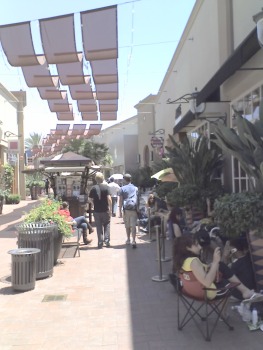
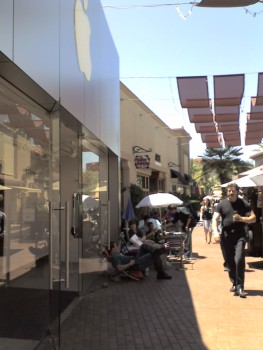
Lining up for the iPhoneSince I was going to the Irvine Spectrum for lunch anyway, I figured I’d drop by the Apple Store and see how many people were there for the iPhone launch. I walked by around 1:50pm, about 4 hours before the event, and sure enough there were a bunch of people lined up all along the shops.

You can see some lawn chairs and umbrellas. The campers are sort of hidden in the shade, which is why I upped the brightness on the second picture. Of course, I’m sure everyone waiting in line appreciated the shade. Those shadows will only get longer over the course of the afternoon, and while there’s a nice breeze once you get out into more open areas, the corridors of the mall are better at channeling people than wind.

Looking toward the Apple StoreWhen I walked by the first time, I only noticed the line running to that corner you can see at the end, maybe 3 storefronts down. About 10 minutes later, after stopping at Kelly’s Coffee, I saw that they were wrapped around that corner, almost the entire length of Forever 21, and stopped at the edge of the patio for the restaurant next door.

Not a huge line—I’ve waited in much longer lines for movies—but bigger than I expected for a phone.

Someone I know encountered a really sneaky eBay phish this weekend. It arrived through eBay’s official “Ask seller a question” system, and consisted of a simple request: Was his auction the same as the auction at the following About Me page?

The URL was a normal eBay URL of the form http://members.ebay.com/aboutme/_____. Pasting the link into another browser brought up the user’s About Me page… which consisted of a spoofed eBay login form that would submit the username and password to a page hosted at Yahoo.

So it not only came through eBay’s official messaging system, but the form appeared on eBay’s own website, meaning it bypasses many of the usual cues. It’s not a secured page, but use of SSL for login pages is still spotty enough that a user could easily miss that. And how many people have noticed that eBay only puts login forms on signin.ebay.com? You have a slightly better chance if you have a browser like Opera, which shows you the target* of a form when you hover over a button. If you think to look at it. Continue reading →

A few years ago, it seemed like everyone was using X in their software versions. Mac OS X. Windows XP with DirectX and ActiveX*. Flash MX, ColdFusion MX, and anything else by Macromedia MX. Macromedia managed to confuse things by releasing two rounds of MX versions, such as Flash MX, Flash MX 2004 (essentially versions 6 and 7).

It’s fallen a bit out of favor. Among those still unwilling to use plain version numbers, vintages are still popular. Office 2007, Norton Security Suite 2006, etc. Even though Apple still uses the X to promote its operating system, the last two have put a lot of emphasis on the cat-themed code names: Panther, Tiger, Leopard. And then there’s Windows Vista.

What do you think the next naming fad will be?

*ActiveX was actually a cross between two naming fads. For a while, everything Microsoft did seemed to be Active—Active Desktop, Active Directory, etc.)

ยปAll pages site-wide with this tag