A few lessons we learned the hard way on our recent trip to Chicago for Worldcon/Chicon 7.

#1: Don’t count on laundry being easy. The hotel we stayed at didn’t have a laundry room, but they did have a laundry service…for $8 a shirt. Fine for the business traveler who needs one outfit cleaned, but a family of three could spend hundreds of dollars on a single load. No problem, you might think: find a laundromat. No such luck: As near as we could find, there are no laundromats in downtown Chicago. I ended up spending $12 each way for a taxi out to the suburbs so we could have clean clothes for the second half of the trip. The most expensive load of laundry I’ve ever done, but an order of magnitude cheaper than the hotel laundry service.

What do people who live in Chicago do if their washing machine breaks down? Or do the high-rise buildings have extra laundry rooms for residents?

#2: Having your toddler’s own car seat on the airplane is great. Lugging it around the airport, hotel, shuttles and taxis? Not so much. J slept through the first ⅔ of the flight out and the first ⅓ of the flight back. Despite the unfamiliar circumstances of the plane, he was in a familiar, comfortable seat, and I’d recommend it for any parent who can afford to buy their toddler his/her own seat. But it’s still a pain to drag it around. Update: We’ve since picked up a tiny folding luggage cart. We can roll the seat all around the airport, then fold up the cart and put it in a carry-on bag. I think it cost about $15-20.

#3: Remember to factor in parking when evaluating the cost of car rental. Since we were bringing the child car seat anyway, we figured we’d rent a car and just snap it in. It worked well enough, but when we got to the hotel we were faced with a $52/night parking charge. Over 9 days, that added up to more than the cost of renting the car! And the first place we drove to, Lincoln Park Zoo, cost $30 for parking – more than cab fare would have been.

It became clear that most of what we wanted to do was going to be within walking distance, and it would be cheaper to return the car early and take taxis to the places farther out. That’s exactly what we did.

#4: How much Internet access do you really need? Our hotel had a nice setup: A) $12.95 for 24 hours for up to three devices for in-room wi-fi. B) Free wi-fi in the lobby. C) Convention areas were paid for by the con. Over 9 days we pulled out the laptop maybe three or four times, and we used the tablet every day.

The thing is, my heaviest online use of the tablet was in the convention, not in the room. In the room, I was mostly checking email/social networks or playing offline games, or one of us was reading (either to ourselves or to J). These are low-bandwidth activities where high latency isn’t a problem, and it would have been fine to fire up the phone’s mobile hotspot for a few minutes or even read email offline & let it sync the next time I was in the lobby. (I caught up on email on the airplane on the way back, then let the changes & replies sync up after when we landed.)

Obviously this will depend on how connected you want or need to be, and what other devices you have. In our case, we paid for 7 or 8 days of internet and probably only needed 3 or 4.


When my son was younger, I longed for the day when he’d be able to talk, just so it wouldn’t be a guessing game every time he wanted something. Now that he can tell us whether he’s hungry, thirsty, wants to play ball or take a bath, wants something specific to eat, etc., it’s a lot easier to respond (even if it’s to tell him that no, he can’t have any pie because he refused to eat dinner).

Most of the time.

There are still a lot of things he understands but can’t say, so he tries to get the idea across some other way. Instead of 20 questions, it becomes a riddle game.

As an example: Last night he kept saying “pee.” This variously means “piece” (either as an observation or a request), “please” (though he usually signs that still), or, well, pee. After ruling out the obvious, we couldn’t figure out what he was trying to ask for or comment on until I realized he was always saying it while pointing at, looking at, or touching my desk, where I had set a roll of tape that I’d let him play with pieces of the other day…and made the connection with the other random comment he’d been pulling out every few minutes: pointing to a half-healed scrape on his foot from last week and saying “Ow.”

He wanted a new band-aid for the scrape: A piece of something like the tape on my desk for the owie on his foot.

Remember about a year ago when people were all freaked out about a supposed missile launch off the coast of Los Angeles, even though there was no sign of it on radar and no one claimed responsibility? Remember how it turned out to just be an airplane contrail seen head-on so that it looked vertical? (Actually, I’d bet you probably didn’t hear that part, did you?)

I was reminded of that when I saw this one today. Off the coast of Los Angeles again…pretty close to the airport.

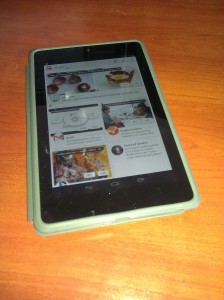
Nexus 7 Tablet in caseSo, I’ve joined the tablet generation. I recently bought a Nexus 7, Google’s latest 7″ tablet.  Here are some first impressions.

Performance is very nice. The games I’d played on my (almost two-year-old) phone are much snappier, plus of course the bigger screen helps a lot.

Within minutes I was typing a lot faster than on my phone, at least when holding it horizontally. Downsides: It’s easy to hit the menu buttons while trying to hit the space bar. Editing is a pain. I miss having arrow keys or a trackball.

The screen size and resolution are just inside the edge of being able to read a full page of a comic book without resorting to guided view. This will change as I get older, but tech will no doubt improve, and I may end up using a larger tablet in the future. I just wish comiXology’s app made it easier to locate comics I’ve already purchased and want to download.

Backup/restore pulled in all my WiFi settings from my phone, which was convenient.

A tablet is much nicer for catching up on news/email/Facebook at breakfast than a phone. Or a desktop or laptop, for that matter. It’s also nice if you drop in at Coffee Bean to relax for a half hour.

My toddler loves the tablet. A few days ago while I set up his breakfast, he grabbed it off the table, set it on the floor, opened the cover, and tried tapping on the screen to wake it up. So far I’ve let him play Fruit Ninja and a couple of interactive kids’ books. He doesn’t quite have the coordination to avoid the edge of the screen, though, so he keeps bringing up a search or dropping back to the home screen while he’s trying to play. I need to find an app to temporarily lock in the running app, so that (a) he won’t get too frustrated and (b) I can look away for 30 seconds and not worry that he’ll end up clicking on an ad for something.

Reading a novel in ordinary indoor light was just fine, and comparable to reading on a Kindle 2. It’s not that great in bright sunlight, though.

Book Navigation on the Google Play Reader takes some getting used to. I’m reading Year Zero, which has a lot of footnotes. You can tap the number to jump to the note, but I kept missing it, or missing the link back to the source. And then trying to return, I’d accidentally tap the slider, jumping forward 1/3 of the way through the book, and reflexively hit the Back button, which doesn’t go back to where you left off, but goes back to the home screen. By the second chapter, I’d stopped reading the footnotes as I got to them and figured I’d just read them when I got to the end of the chapter, which of course removes them entirely from context.

I don’t really mind not having a camera (except the front-facing one for conferencing), because it’s a bit bulky for a camera if I’m not going to get the benefit of actual optics out of it, and I usually have a phone or actual camera anyway.

I am sort of regretting that it’s Wi-Fi only, though, because intermittent access does limit things a bit. Anything you’ve already downloaded is fine, of course, but Google Docs Drive is virtually useless without a connection. I definitely need to look for some sort of local word processing app for writing offline notes. On the plus side, it reconnects automatically to remembered networks, and Gmail at least seems to sync immediately — both with incoming and outgoing mail, so you can read, compose and “send” offline, and new messages will go out as soon as you’re back in WiFi range. (Also, I don’t have to add another $25/30 monthly data plan on top of both our phones.)

Overall, I’m liking it a lot. It’s great for casual reading, communication, and games, and it looks like it’ll work well for writing. I need to look for a decent image editor and offline word processor, and fix a few issues with my WordPress install (I’m using a CDN tool on this site that doesn’t play nicely with image uploads from the mobile app), and I think it’ll be great for travel as well.

Update: Nothing to do with the tablet itself, but I can’t believe WordPress’ Android app still has the bug where if you upload a draft, it pre-fills the publication date so that the post ends up being back-dated when you finally finish it.

A lot of articles on SEO make me cringe, because they tend to have the attitude that Google (and it’s always Google) owes them traffic because they jumped through all the right hoops, and how dare they ever change what those hoops are!

It’s refreshing to see an article by someone who recognizes that Google’s job is not to give websites high rankings, but to show readers what they’re searching for. Their algorithm is a way of measuring how closely you match that goal, not the goal itself.

Doing your SEO solely by targeting today’s algorithms is like only studying what you know is going to be on a test: it might work for this test, but it won’t help as much on the next one…or when you get out into the real world.

People aren’t looking for backlinks and keyword density. People are looking for content. In the end, no matter how tricked out your SEO is, it’s compelling content that keeps people coming back.