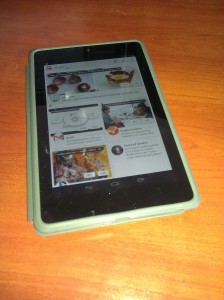
Nexus 7 Tablet in caseSo, I’ve joined the tablet generation. I recently bought a Nexus 7, Google’s latest 7″ tablet.  Here are some first impressions.

Performance is very nice. The games I’d played on my (almost two-year-old) phone are much snappier, plus of course the bigger screen helps a lot.

Within minutes I was typing a lot faster than on my phone, at least when holding it horizontally. Downsides: It’s easy to hit the menu buttons while trying to hit the space bar. Editing is a pain. I miss having arrow keys or a trackball.

The screen size and resolution are just inside the edge of being able to read a full page of a comic book without resorting to guided view. This will change as I get older, but tech will no doubt improve, and I may end up using a larger tablet in the future. I just wish comiXology’s app made it easier to locate comics I’ve already purchased and want to download.

Backup/restore pulled in all my WiFi settings from my phone, which was convenient.

A tablet is much nicer for catching up on news/email/Facebook at breakfast than a phone. Or a desktop or laptop, for that matter. It’s also nice if you drop in at Coffee Bean to relax for a half hour.

My toddler loves the tablet. A few days ago while I set up his breakfast, he grabbed it off the table, set it on the floor, opened the cover, and tried tapping on the screen to wake it up. So far I’ve let him play Fruit Ninja and a couple of interactive kids’ books. He doesn’t quite have the coordination to avoid the edge of the screen, though, so he keeps bringing up a search or dropping back to the home screen while he’s trying to play. I need to find an app to temporarily lock in the running app, so that (a) he won’t get too frustrated and (b) I can look away for 30 seconds and not worry that he’ll end up clicking on an ad for something.

Reading a novel in ordinary indoor light was just fine, and comparable to reading on a Kindle 2. It’s not that great in bright sunlight, though.

Book Navigation on the Google Play Reader takes some getting used to. I’m reading Year Zero, which has a lot of footnotes. You can tap the number to jump to the note, but I kept missing it, or missing the link back to the source. And then trying to return, I’d accidentally tap the slider, jumping forward 1/3 of the way through the book, and reflexively hit the Back button, which doesn’t go back to where you left off, but goes back to the home screen. By the second chapter, I’d stopped reading the footnotes as I got to them and figured I’d just read them when I got to the end of the chapter, which of course removes them entirely from context.

I don’t really mind not having a camera (except the front-facing one for conferencing), because it’s a bit bulky for a camera if I’m not going to get the benefit of actual optics out of it, and I usually have a phone or actual camera anyway.

I am sort of regretting that it’s Wi-Fi only, though, because intermittent access does limit things a bit. Anything you’ve already downloaded is fine, of course, but Google Docs Drive is virtually useless without a connection. I definitely need to look for some sort of local word processing app for writing offline notes. On the plus side, it reconnects automatically to remembered networks, and Gmail at least seems to sync immediately — both with incoming and outgoing mail, so you can read, compose and “send” offline, and new messages will go out as soon as you’re back in WiFi range. (Also, I don’t have to add another $25/30 monthly data plan on top of both our phones.)

Overall, I’m liking it a lot. It’s great for casual reading, communication, and games, and it looks like it’ll work well for writing. I need to look for a decent image editor and offline word processor, and fix a few issues with my WordPress install (I’m using a CDN tool on this site that doesn’t play nicely with image uploads from the mobile app), and I think it’ll be great for travel as well.

Update: Nothing to do with the tablet itself, but I can’t believe WordPress’ Android app still has the bug where if you upload a draft, it pre-fills the publication date so that the post ends up being back-dated when you finally finish it.

A lot of articles on SEO make me cringe, because they tend to have the attitude that Google (and it’s always Google) owes them traffic because they jumped through all the right hoops, and how dare they ever change what those hoops are!

It’s refreshing to see an article by someone who recognizes that Google’s job is not to give websites high rankings, but to show readers what they’re searching for. Their algorithm is a way of measuring how closely you match that goal, not the goal itself.

Doing your SEO solely by targeting today’s algorithms is like only studying what you know is going to be on a test: it might work for this test, but it won’t help as much on the next one…or when you get out into the real world.

People aren’t looking for backlinks and keyword density. People are looking for content. In the end, no matter how tricked out your SEO is, it’s compelling content that keeps people coming back.

ShareThis is rolling out a tool for “frictionless sharing.” That’s the term for those apps or widgets that “let” you broadcast everything you do on a site to your social network. I suppose it sounds great for publishers, because your content gets shared more, but…

As someone who reads stuff online, “Frictionless sharing” is a privacy disaster waiting to happen. Undo is nice, but in a world where updates are pushed instantly, you can’t count on it.

As someone who follows social networks, it’s just more noise. I don’t want to know every article you read in your latest wiki walk. I’ll tune it out, or I’ll tune you out. What I want to know is which articles, photos and videos you think are worth sharing.

Fury after Facebook messes up smartphone users’ address books:

Remember how Facebook sneakily changed your default email address to @facebook.com? … Some smartphone users…are reporting that their on-phone address books have been silently updated to make @facebook.com email addresses the default way to send a message to their contacts.Graham Cluley at Sophos

The lesson: Whenever you change something, always consider the impact on things that depend on it.

This reminds me of the ill-fated Network Solutions attempt to replace failed DNS lookups with responses directing web browsers to search pages, not considering that web browsers aren’t the only software that uses DNS, or that some of that software might depend on accurate “this domain does not exist” info.

Originally posted on Google+

So, NPR ran a post by an intern who doesn’t get the whole paying-for-music thing — or, rather, realizes now that she ought to, but doesn’t want to pay for physical media of specific songs or albums.

The Trichordist responded with an open letter about the ethics of file sharing, which is a great read from the artist side of the fence, but also mixes up several issues. In particular, it misrepresents a large part of the “other side.” He starts off saying that Emily White seems to have succumbed to “false choices” presented by “Free Culture,” then goes on to present his own false choices, somehow managing to characterize rampant piracy, Creative Commons*, and the tech industry as if they’re all the same thing.

The issue is not simply “pay for everything” vs “take what you want because you can.”

Among other things it’s about recognizing that distribution channels have changed, so business models must as well. It’s about trying to come up with a system that doesn’t put unnecessary roadblocks in place. It’s about enabling those who do want to share their art in different ways to be able to do so easily.

Edit: It’s also about, and here’s where the tech industry comes in, recognizing that technology does change the legal landscape. Remember the debate over whether Google should pay up for thumbnails in image search results? (Kind of like requiring card catalogs to pay to use the title of the books they refer to.) Or Congress trying to decide whether copying a media file or program from disk to RAM constituted a legal “copy” subject to copyright restrictions?

Edit 2: And then there’s the matter of opening up the gray areas, or rather the areas that most of us intuitively see as gray, but that current copyright law treats as black and white, such as fan art and fan fiction. Technically, a six-year-old’s scrawled Mickey Mouse is illegal. Technically, software companies can tell you how many backups you’re allowed to make. Enforcement is spotty (fortunately), but that means if someone wants to get you in trouble for something else, all they have to do is report you.

If you want to make music and I want to listen to it, I’m happy to pay you for it. I have a lot of music on my iPod, and yes, I’ve paid for it. My last MP3 purchase was a week ago. Heck, I’ve bought music from Jonathan Coulton, who gives it away for free (under a Creative Commons licence, I might add).

So yeah, I’m willing to pay for music. But I don’t want to have to pay separately to listen to the same music on my home sound system, on my computer, on my phone, and in my car because your publisher has decided to put DRM in place that makes it difficult for me to move that music around. If you live on the other side of the planet from me, I want to be able to give you money directly and download the song over the internet instead of having to wait for publisher A to make a deal with publisher B and ship physical media around.

Technology has presented us with new ways of distributing art. Something like Pandora or Spotify would have been impossible before broadband internet. So let’s find ways to make it work for everyone instead of characterizing everything that isn’t pay-per-song as no better than looting.

It doesn’t help to complain about one set of false choices and then present your own.

*He cites the Creative Commons’ tax return to indicate the backers of the Free Culture movement, so it seems clear he looks at them as the same thing.

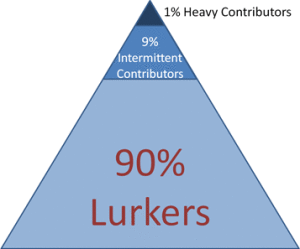
Community participation pyramid: the 90-9-1 Rule (Jakob Nielsen)Sometimes it seems like more people are talking about Google+ than using it, but it really depends on the community you’re looking at. Comics fans? Not well represented. (But they’re even harder to find on Pinterest.) But “Bad Astronomer” Phil Plait has a thriving following.

It seems like Speed Force’s Google+ Page is starting to attract a bit more participation, and I think that might be in part due to it passing the 100-follower mark. I vaguely recalled something about a 90-9-1 Rule for community involvement, which turned out to be pretty easy to find once I searched for it.

Basically, the rule states that:

  • 90% of community members are “lurkers” who read or observe, but don’t contribute.
  • 9% contribute occasionally (i.e. comment, “Like,” +1, share)
  • 1% contribute frequently, and account for most contributions

Continue reading →

Techcitement writes: The Universal Lapdock Is Coming:

Enter the ClamBook, the first Android-compatible product by iPad keyboard-case maker ClamCase. Using a single MHL cable…the ClamBook provides an Android-laptop experience delivered by your phone.

The problem I have with this idea is that it’s essentially a second device, but one that can’t be used without the first one. If I’m going to have a second device to begin with, I think I’d rather have an actual tablet or ultra-light laptop.

Originally posted on Google+

Update (3/2019): I’ve been looking around, but I’m not sure this was ever released. All the search results I’m finding are articles based on the announcement in June 2012, and ClamCase is now a couple of iPad keyboard cases made by Incipio. The laptop dock concept is still around, but it doesn’t seem to have caught on nearly as well as tablet keyboards and convertible tablet/laptop 2-in-1 devices.

»All pages site-wide with this tag