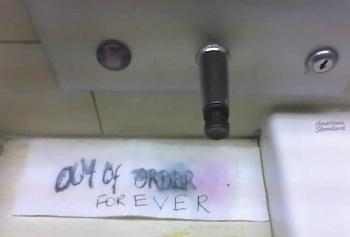
One of the two soap dispensers in the bathroom at work has been broken for months. I think the building doesn’t fix it because it looks full. Over the past week or two, someone has started writing things like “Broken” or “Still Broken” (or, one day, “Kaput”) on paper towels and leaving them underneath or draped over the dispenser. Someone decided that this makeshift “Out of Order” sign needed an addition:

Out of Order -- Forever

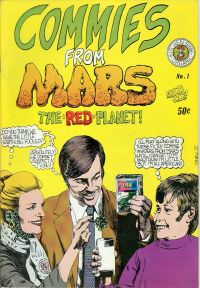
The Grand Comics Database* is a project to index the titles, dates, credits, covers, and character appearances in every comic book ever published. A sidebar on the home page shows the latest cover scan contributed. A couple of days ago, that cover scan was this:

Cover of Commies From Mars: The Red Planet

The image links to the GCD entry, which is still a stub right now, but apaprently it was printed in 1973 by Kitchen Sink Press. Here’s the kid’s thought balloon:

I’ll play along with these filthy commie invaders from Mars until I can get to my shotgun! I’m little, but I’m all American!

On a related note, I’ve just made reservations to see Scott Shaw!’s show, Oddball Comics, running in LA through February (hat tip: News From ME).

*I’ve found it very useful for finding info for my Flash site. Unfortunately it isn’t big on supporting characters, so I’m still tracking down issues myself to fill in the details. On the other hand, this way I can acutually read the stories.

Here’s a piece of friendly advice from a mail server admin to companies that interact with subscribers and customers via email:

Pick one domain name for your business. Just one. Don’t use any other domains in your emails, even if you want to keep order confirmations separate from promotions. If you contract out for some other company to send out a newsletter or survey to your customers, insist that they send it out using your own domain name. If you’re using DomainKeys or SPF, make sure they’re authorized or send it yourself. And don’t even think of making the links through redirection scripts, even if you really want to track which subscribers are clicking.

Why?

Two words: Spam and fraud. Continue reading

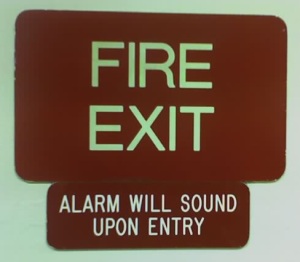
Fire Exit - Alarm on Entry

I saw this sign at a shopping mall food court a few weeks ago. It managed not only to contradict itself (is it an exit or an entrance?), but also to contradict available evidence, as the door was ajar at the time—with no alarm. About thirty seconds later I saw a janitor carry some cleaning supplies “out” through the door as if he were returning them to a supply closet.

And on a related note:

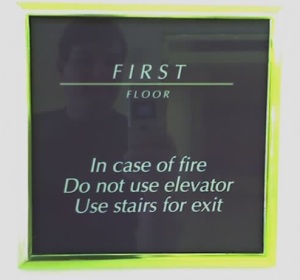
First floor - use stairway for exit.

This probably won’t be funny across the pond, but here in the US the “first floor” is the same as the ground floor. If you leave the first floor using the stairs, you’re not getting out of the building!

I was preparing my latest favorite work-suitable drink a few minutes ago, and a drop of tea spilled over the side of the mug and ran down to the base. Naturally it immediately spread around the entire base, forming a ring on the desk. It was easily wiped up, but then I thought—why does it always spread around the entire base to form that unmistakable coffee ring?

It occurred to me that it might just be capillary action with the liquid flowing along the V-shaped channel formed by the table and the edge of the mug. Some googling did turn up the fact that ring-shaped coffee stains from single drops are caused by capillary flow [dead link]: as the drop evaporates, it draws water from the inside.

But the instant ring from the mug? Either it’s something else, or it’s so obvious no one has thought it worth writing about.

Posting an Opera button on your website or blog is a great way to encourage people to try out the browser — but what if the visitor already uses Opera? It shows solidarity, but what if you could show them something else, something that is new to them?

You might want to replace your regular Opera banner with an ad for Opera Mini. Or show them another graphic of your own design. Or maybe not even a graphic, maybe post some sort of message, like “Opera spoken here!” or “Welcome, Opera visitors!”

It’s relatively simple to do this in PHP, or ASP, or some other server-side script…but sometimes you have to stick with static HTML. Well, client-side JavaScript can replace chunks of your page, and here’s how to do it.

1. Put the following script in a file called operalinks.js:

function replaceOperaLink(linkID) {

if(linkNode=document.getElementById(linkID)) {

if ( 0 <= navigator.userAgent.indexOf('Opera') ) {

var newButton=document.createElement('span');

newButton.innerHTML = '<a href="http://www.opera.com/">Glad to see you're using Opera!</a>';

var parentNode=linkNode.parentNode;

parentNode.replaceChild(newButton,linkNode);

}

}

}

For the innerHTML section, you can plug in a new link and banner, or a special message, or anything you want. (Just make sure that you put a backslash () in front of any apostrophes you use.)

2. Put a unique ID in the tag for your regular Opera button. Use the outermost tag that you want to replace. For example, let’s start it off with this:

<a id="OpLink" href="http://www.opera.com">Download Opera!</a>

3. Load the script in your document’s <head> section:

<script type="text/javascript" src="operalinks.js">

4. Call the function in the body onload event using the ID you chose in step 2:

<body onload="replaceOperaLink('OpLink')">

When the page loads, the script will check the visitor’s browser. If it’s Opera, it’ll replace the banner with whatever message you chose in step 1. It’s compatible with both HTML and XHTML, and you don’t need to worry about using <noscript> tags to make sure the banner still shows up for people with JavaScript disabled.

*This post originally appeared on Confessions of a Web Developer, my blog at the My Opera community.

It’s kind of redundant to post a “Get Firefox!” banner to someone already using Firefox, but it’s useful to show them an upgrade banner if they’re on an old version.  It’s also useful to show Firefox users a banner for Spread Firefox.

This can be done easily with PHP or other server-side scripting languages, but sometimes you have to use static HTML files.  That’s where client-side scripting becomes necessary.  Last month I posted some sample code that used document.write, which doesn’t work with XHTML.  (On top of that, the <noscript> blocks I used ended up causing validation errors because of their location!)

I’ve redone everything with DOM scripting, which will work with either HTML 4 or XHTML 1.0.

1. Put the following in a file called sfxlinks.js:

function replaceFirefoxLink(linkID) {
   if(linkNode=document.getElementById(linkID)) {
      var newLink=document.createElement('a');
      var newImg=document.createElement('img');
      var change=0;
      if ( 0 <= navigator.userAgent.indexOf('Firefox/0') ||
         0 <= navigator.userAgent.indexOf('Firefox/1.0') ) {
         change=1;
         newLink.setAttribute('href','YOUR_UPGRADE_LINK');
         newImg.setAttribute('alt','Upgrade to Firefox 1.5!');
         newImg.setAttribute('title','Upgrade to Firefox 1.5!');
         newImg.setAttribute('src','PATH_TO_BANNER');
      } else if (0 <= navigator.userAgent.indexOf('Firefox')) {
         change=1;
         newLink.setAttribute('href','YOUR_REFERRAL_LINK');
         newImg.setAttribute('alt','Spread Firefox!');
         newImg.setAttribute('title','Spread Firefox!');
         newImg.setAttribute('src','PATH_TO_BANNER');
      }
      if(change) {
         newLink.appendChild(newImg);
         var parentNode=linkNode.parentNode;
         parentNode.replaceChild(newLink,linkNode);
      }
   }
}

2. Use your regular Spread Firefox affiliate link and add a unique ID — let’s use id="FxLink" as an example — to the <a> tag.

3. Load the script in your document’s <head> section:
  <script type="text/javascript" src="sfxlinks.js">

4. Call the function in the body onload event using the ID you chose in step 2:
  <body onload="replaceFirefoxLink('FxLink')">

When the  page loads, the script will check the visitor’s browser to see if it’s an old version of Firefox or a current version of Firefox.  If it’s an old version, it’ll replace your standard button with your upgrade button.  If it’s a current version, it’ll replace it with a Spread Firefox button with your referral link.  Otherwise, it leaves the button alone.

This has a lot of advantages over the old version, including XHTML compatibility, no need for <noscript> blocks, easier validation, and it still degrades gracefully (if JS is unavailable or old, it leaves your normal button in place).

You can see it in action on my website, Flash: Those Who Ride the Lightning.

Originally posted on my Spread Firefox blog.