
ZDNet reports that Windows 7 is doing what Vista couldn’t: convincing people to replace Windows XP. The best quote in this article: “Windows 7 is the Anti-Vista.”
Tag: Windows
Thoughts on Screenshots for Tech Support
I used to get annoyed when someone would send a complete screen shot along with their tech support request. I thought it was a waste of bandwidth when a simple text message would do just as well, and be faster to send, receive and display.
But the thing is, screenshots have their advantages. For one thing, they’re exact. There’s no risk of an error code being mistyped.
More importantly, a screenshot can tell you other information that the user hasn’t thought to mention. This is critical, because the reason people call tech support is because they don’t know how to solve a particular problem…and that often means they don’t know which information is relevant.
Like, say, the fact that they’re running another program which happens to conflict with the one that they’re calling about.
Still, I wish Windows would create a file instead of copying the screen to the clipboard. Users need to paste it into something, so they paste it into what they’re most familiar with: Microsoft Word — something even less suited for sending images by email than a .BMP file created by Paint.
Hello chkdsk, my old friend…
Hello chkdsk, my old friend
I’ve got to run you once again
Cause my Windows box is acting weird
And the disk drive must need something cleared
And the error that was printed on my screen
Made me scream
And put aside my work
For chkdsk
Alphabet Soup: XP SP and EV SSL XSS!
Sorry for the lack of updates this past week. I was just way too busy prepping for our move this weekend.
A couple of interesting news bits I noticed when I got into work this morning:
It looks like I’ve been lucky with installing Windows XP Service Pack 3. I’ve had no problems with the one machine I installed it on. According to Information Week, a lot of people are having serious problems with SP3, including BSOD on AMD-based systems.
Also, NetCraft has a screenshot of a PayPal page with both the green bar of an Extended Validation (EV) SSL certificate and a cross-site scripting (XSS) vulnerability. It’s a step or two beyond the standard lock icon, but there are still limits to what an EV cert can tell you. Unfortunately PayPal and others are really trying to drum “green bar = safe” into people’s heads.
Apple UI Nitpicking
I appreciate that Apple offers a single software updater for all its free Windows software. But one thing annoys me about it.
It opens a window, then opens a message box showing a progress meter as it checks for updates. Only one problem: It fills out the “New software is available” caption before it actually checks.
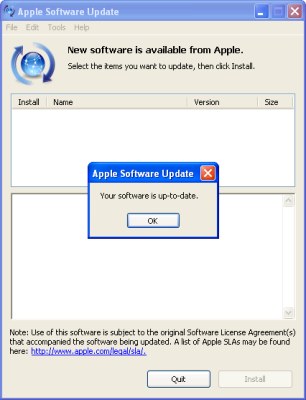
New software is available… oh, wait, no it isn’t.
This isn’t an issue on Mac OS X, because the progress meter is shown as a sheet, which drops down from the top of the main window and obscures the caption. But on Windows, that caption is visible from the moment the window appears, saying that you really do have something new available, raising your hopes that maybe, just maybe, Apple has finally gotten around to releasing that new version of Safari, or that security fix for the flaw you heard about a week ago, then dashing them to the ground.
Or, less dramatically, it’s jumping to conclusions, providing potentially false information.
And then, even if it turns out there isn’t anything new, the caption stays in place…leaving you with two contradictory statements as to whether any updates are really available.
Mac OS X: Leopard Pouncing
It’s funny: When Microsoft releases a new OS, my inclination is to sit it out and wait for the first service pack, usually a year or so in. When Apple or Fedora releases a new OS, my inclination is to upgrade as soon as I have the time. Even though all of them have had histories of significant problems on one release or another—the broken video driver I ran into on Fedora 7, for instance, or the firewire drives fried by one version of Mac OS X.
I’m not sure why that is. Maybe it’s trust. Maybe it’s speed of the fixes: Linux vendors will have updated packages within days to weeks. (Heck, some Linux distros have updates available by the time the ISOs go live, because a bug was fixed after the contents were frozen.) And you can count on a Mac OS 10.5.1 in a month or two. Maybe it’s the scale of problems. You risk things like broken drivers or software with anyone’s major OS upgrade, but Windows always seems to have some problem that’s bigger than just a bug fix, something that needs more time and effort to redesign. In short, something that won’t get fixed until the next service pack.
Update 2026: Sadly, this is no longer true. For the last few years, I’ve been holding off my macOS updates for at least a year, which usually means waiting until the next version after it launches. As for Windows…I put in for the extra year of Windows 10 fixes and downgraded a device from Windows 11 because the one piece of hardware I “upgraded” turned into an unusably slow mess.
Somewhere along the line I got in the habit of waiting a couple of weeks on Fedora updates to make sure third-party graphics drivers catch up, which turned out to be fortunate with the most recent release.
Safari on Windows
 Wow. I have to admit I was not expecting this at all, but Apple has just announced they’re releasing the Safari web browser for Windows.
Increased consumer choice, of course, is a good thing. The most immediate benefit, though, is that Windows-based web developers (the majority) who haven’t been willing to buy a Mac to test their sites in Safari will be able to do full testing on all four major rendering engines: Trident (IE), Gecko (Mozilla/Firefox/etc.), Webkit (Safari) and Presto (Opera).
Also, there’s some really cool stuff available in recent versions of WebKit that will be great to have available for a wider audience.
Interesting thought: this may be the first browser released since Opera expanded to Linux in ~2000 that is available in the same version on Windows and Mac, but not Linux. Even when Internet Explorer was available for the Mac, it used a different engine than the Windows version did.
I wonder what impact this will have on the development of Swift. Its main claim to fame was porting WebKit to Windows, and it’s been months since their last release.
I also wonder what the status is on re-merging the KHTML and WebKit forks. It’s gotten to the point that Konquerer is only an approximation of Safari, making testing on Linux a little harder than it used to be.
(via Asa Dotzler)
No doubt there’s a 500-comment Slashdot discussion already.
Update: Slashdot’s all over it, and Opera Watch has a thread going as well.
Update 2: I’ve posted my thoughts on the implications for Opera. There’s an update at CSS3.info, where they have previews of upcoming CSS features available in Safari 3.
Update 3: I’ve updated the Alternative Browser Alliance to reflect Safari’s new status. This also solves a nagging doubt I’ve had as to whether the default browser on Mac OS should really be considered “alternative.” On Windows, it definitely is.
Update 4: The Webkit team and Web Standards Project have weighed in. The Windows version of WebKit should be available later today, which will be nice for following progress on issues as it moves from beta toward final version. It turns out there’s a regression and at least the Windows version no longer renders the Acid2 test correctly.
Update 5: The author of Swift says that Swift isn’t going away [edit: the blog has since vanished], and points out that “Swift renders more like a Windows Application, both in the GUI and in WebKit. Safari, looks just like OS X, similar to iTunes 6 and below.” Ever since Apple started porting apps to Windows, I’ve found something odd: A common complaint about third-party Mac software is that it doesn’t look and feel native (one of the big reasons we have Camino as well as Firefox), yet when Apple ports their own apps to Windows, it makes them look exactly the same as they do on Mac OS instead of making them work like native apps. I mentioned this to Katie yesterday and she suggested it might be a case of turnabout being fair play.