In cleaning up dead links, I stumbled on an old post about linkrot in which I wondered “how much of what exists today will still be around – in any form – ten years from now.”

Well, it’s been ten years. That post had seven external links. Four of those are no longer active, though I was able to find three of them on archive.org. (The fourth was a link to a search result set on AltaVista. Yes, AltaVista.)

That’s right: More than half of the links on an article about linkrot have rotted away. Appropriate, that. And a reminder to always provide some context when linking out to something that you can’t personally ensure will stay online.

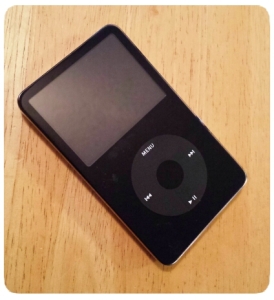
Fifth generation iPodAs I moved our iTunes library last week, I worried that the new system might not be able to sync with the old iPod, but relaxed when I saw that Apple still sold the click-wheel iPod Classic. They discontinued it a few days later, but fortunately we were able to sync the old devices.

Why do I prefer the older iPods with physical buttons and tiny screens?

Because I listen to music in the car, and a touch screen is a terrible interface for quick actions while driving.

While touch screens are better for menus, searches, finding albums, playlists, artists, and just about anything else, they’re actually dangerous for driving. A physical control of some sort is best for any action you might have to take while behind the wheel of a moving car.

Pause/Play, Skip and Volume. Those are the key things you want to be able to do with music without thinking too much about where you’re reaching, or taking your eyes off the road. (Especially if you have a mix of quiet and loud songs.) Volume’s on the dashboard, but it’s so much easier — and safer — to hit an actual button for pause/play or skip than to jab at the touch screen until you get it right.

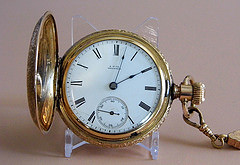
Every time someone announces a smart watch (today it’s the Apple Watch), people trot out the idea that the wristwatch is obsolete because look, I already have a smartphone with a clock on it. But phones don’t completely replace wristwatches. They completely replace pocket watches.

pocket watch photo
Why do I need a wristwatch? I have a clock in my pocket!
Photo by France1978 (CC)

The wristwatch thoroughly replaced the pocket watch for most of the twentieth century because it’s so much more convenient. You don’t have to pull it out of your pocket to look at it. You don’t have to worry about dropping it. You don’t even need free hands to check the time.

The only reason we went back to pocket watches is that the new ones can do so much more than the old ones did. That and so many of us are spending so much time sitting in front of a glowing rectangle with a clock in the corner. (Note to fellow geeks: not everyone does this, so don’t generalize your experience.) As with cameras, music players, and portable game systems, we abandoned a specialized device in favor of a multitasker that wasn’t quite as good at the job. The difference is that with the wrist watch, its advantage wasn’t something that newer technology could catch up on. It was the form factor.

Smartwatches, in concept, are not a step backward, even if this generation’s specs leave something to be desired (and I’m not just talking about enabling the wearer to “start and stop the flow of time”). They’re a step sideways to a different use case. It’ll take time (no pun intended) and experimentation by real-world users to shake out what it’s best suited for.

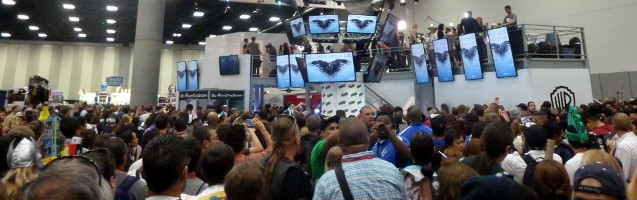
SDCC Crowd with TVs

Social media has drastically changed the online aspect of Comic-Con. So much is up instantly that you can follow the event live without setting foot in San Diego. But for those of us who are on-site, there’s a trade-off between being part of the conversation and part of the convention.

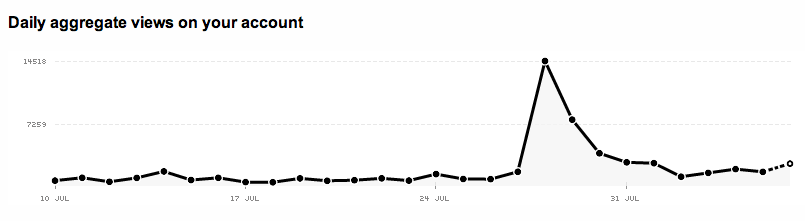
Because we can post in real time, people want to follow in real time too, and lose interest quickly afterward. No matter how interesting I think my follow-up articles might be, none of them are read anywhere near as much as the half-assed pieces that go up during or right after the con. Even interest in photos drops off steeply as soon as the event is done:

Flickr SDCC traffic graph

But it takes time to write and edit, to curate, crop and adjust, and (dare I say it) to promote — and if it’s not your job, it comes at the expense of other things you could do at the con.

There’s Far Too Much To Take In Here

I’ve been posting my con experiences and photos for over a decade now. At first I’d just post when I had time. Once I had a smartphone, Twitter, and a second blog at Speed Force, I was live-tweeting and live-blogging everything.

Then in 2011, my wife and I left our then-infant son with relatives and spent a single day immersed in the pop culture madness. It gave us a new perspective:

  • Comic-Con is gigantic.
  • Your time at Comic-Con is limited.
  • Make the most of it!

I changed the way I approached the convention. No more liveblogging; other people are doing that for their job. No presentations that will just be online by the end of the day anyway. No three-hour lines. I wanted the experience I could only get by being there.

I also cut my social media activity to a minimum:

  • Instagram when I had a minute or two of downtime, set to auto-share pictures out to Facebook, Tumblr, etc.
  • Twitter rarely, again when I had a little downtime. No more stopping in the hall to post a comment. This year I didn’t even check for conversations (which, it turns out, I should have).

Sure, I’m a little disappointed that my SDCC 2014 writeup hasn’t been read by very many people, but it’s partly to help me remember this year’s con when I look back at it later. Our photo album at least got some attention. But you know what? If I’d taken the time to write about it during the con, whether live or nightly, I wouldn’t have had as much to write about, and I wouldn’t have enjoyed it as much. I think that’s a good trade-off.

P.S. Apologies for the clickbait headline. It seemed appropriate for the subject matter.

You’ve probably seen the story about how a group of teenagers showed that plants won’t grow next to a WiFi router. We did our own experiment, but first some things to consider about the story making the rounds:

  • They tested whether cress seeds would germinate near a wi-fi router.
  • The seeds by the router DID grow, just not as well as the control group.
  • The photos accompanying the news articles I saw don’t match the photos that appear in the report. They actually look like a before and after set.
  • It was done a year ago, in spring 2013.
  • It was a school science project. That’s not a knock, they did some good things like sending traffic through the router to make sure it was actually transmitting, and mixing seeds from multiple packets together to eliminate differences between batches.
  • As with all science, the results need to be repeated in more experiments with rigorous controls to be sure they accounted for all variables.
  • I couldn’t find a followup study in all the blind repostings of the original OMGWIFI claims, though I did find a discussion at JREF. If you can read past the annoyingly dismissive comments, you’ll also find some insightful remarks and links to the actual presentation (in Danish, so it’s tricky to read, but they have charts and photos)…and a few anecdotal stories by people who use the heat from their wireless routers to HELP germinate seeds!

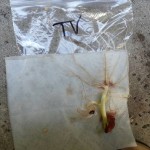
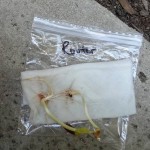
After we read up on this, Katie decided to do a simple experiment herself. She put seeds next to our router, on top of our refrigerator, next to the TV, and for a control, outside. She found that the seeds placed next to our router did just fine — considerably better than those left outside, and slightly better than those placed elsewhere around the house.

Each bag contained one kidney bean, one black-eyed pea, and one seed from the red bell pepper I cut up for dinner. I put a section of select-a-size paper towel, folded twice, in each and set the seeds inside the second fold. Each bag got 15 mL of Brita filtered water and the air was squeezed out before sealing. Then I left them around the apartment for several days to see if they’d sprout. This is a picture of what resulted.

I wonder if the seeds in the school experiment just dried out. Katie sealed her seeds in plastic bags, which allowed radiation to pass through, but trapped moisture. As I understand it, the students watered their seeds throughout the experiment, but it’s possible the trays dried out overnight. Comparing moisture content/retention would be an interesting follow-up.

Obviously, this isn’t any more rigorous than the original experiment. But it shows that the results they found are the beginning of the process, not the last word. More importantly, it’s something you can easily test yourself if you’re so inclined. Next time you see a startling claim that’s something you can test without too much trouble, try checking it out for yourself.

Incidentally: We planted the seeds in our patio yesterday. With any luck, they’ll do as well as our tomatoes (and better than our poor carrots) this year!

Usability researchers like Jakob Nielsen have long contended that people read differently online than on paper: they tend to skim, follow links, and jump off quickly if they don’t find what they want. (Rather than being judgmental, Nielsen simply advises that you tailor your online writing to this.)

Now the Washington Post reports that people are observing a spillover effect, with online skimming habits interfering with concentration when it comes to more in-depth reading…even when reading print.

Sadly, the article mostly distinguishes between two modes of reading:

  • Online skimming of casual articles and social media on screens.
  • Serious reading of novels and in-depth content in print.

There’s nothing to distinguish, for instance, reading on a dedicated e-reader (without the siren call of Facebook or hyperlinks) from reading on your laptop. Nor is there anything to distinguish casually reading on your phone’s tiny screen from reading at your computer, or sitting on the couch and reading on a book-sized tablet.

A tablet and a breaking paperback.

Personally, I’ve found display size to be the biggest factor in maintaining attention. I get tired of reading on my phone, and I tend to skim on a desktop or laptop, but a handheld tablet (I have a Nexus 7, which is close to the size of a paperback book) works out about right. I’d much rather read a long article on that tablet than on a computer, even with the browser window sized for optimal column width.

So yeah, it’s much easier to concentrate on something long in a book than on a desktop or cell phone…but an ebook reader or a tablet is a lot closer.

There are still tradeoffs: My Les Misérables re-read changed drastically when I switched from a paperback to my tabletnot because I couldn’t concentrate on long passages, but because my method of notetaking changed. My reading actually sped up, but my commentary slowed down. (It did ultimately take me longer than I expected to finish the book, but only because I had so many other books I wanted to read, and ended up taking breaks and reading them instead.)

The main problem I do have with a tablet isn’t continuing to read, but starting to read. Even without a wifi signal, it’s tempting to catch up on email, or saved articles in Pocket, and before I know it, I’m done with lunch and I haven’t even opened the book I’d planned on reading.

(Via Phi Beta Kappa)

I was reading up on wearable computing today, and with the SDCC badge presale looming, I found myself wondering whether a smart watch would be useful for Comic-Con.  (No plans to actually buy one, I’m just thinking.) I don’t normally wear a watch these days, but it does get annoying to have to reach into my pocket when I want to check the time. For this reason, I make a point to wear a watch at conventions so that I can see the time at a glance and avoid missing events or meetup times.

So, keeping in mind that the current generation of smart watches (Pebble, Galaxy Gear, etc.) mostly pair up with a phone to do the heavy lifting…what might a smartwatch do better for a con than a phone (or a regular watch)?

1. Messages. Between the noise and the walking, it’s already too easy to miss calls or even texts when you’re out on the floor of the convention. It’s easier to notice a buzz on your wrist than a buzz in your pocket, and less intrusive to glance at your wrist to see if it’s something urgent when you’re interacting with people in the real world. You can also tell instantly when you’re crowd-weaving to meet someone whether that text they just sent is “I’m here,” “Running late,” or “Change of plans, meet me at Hall G lobby.”

2. Schedule reminders. Put the event, time, and room number on the screen. How to make it more awesome: pull down the floorplan and use your location to calculate how long it’ll take to get there, and notify you far enough ahead of time that you can make it, Google Now-style. This is more useful for smaller conventions or at least smaller panels at SDCC, since the big ones require you to line up way ahead of time anyway.

3. Wi-Fi hotspot detector. Even if the watch doesn’t support wi-fi, your phone does, and it can ping the watch to let you know.

4. Breaking news alerts. Ironically, I feel like I miss more news when I’m at Comic-Con than when I’m following along from home. This would have to be very well filtered in order to be useful without pulling you out of actually experiencing the convention.

A step counter would be interesting, but I can probably find an app for my phone.

I doubt I’d use a wrist-mounted camera like the one on Samsung’s Galaxy Gear much. Google Glass would be more practical for the blink-and-you’ll miss-it moments, and if you have time to compose a shot, you have time to pull out a phone or dedicated camera. OTOH, a wrist camera is probably a little less creepy than Glass. (On the gripping hand, maybe not.)

Of course the absolute best use of a smartphone at Comic-Con:

5. Get one that can actually handle calls, and wear it with a Dick Tracy costume.

What uses can you think of?

»All pages site-wide with this tag