Twitter writes that link length shouldn’t matter, but the zillions of URL shortening services out there show that, for now, it does.

But why?

There are two main reasons to shorten* a link:

  • There’s a technical limit, such as SMS message length or email line width.
  • You expect people to manually enter the URL.

Right now, with Twitter messages limited to 140 characters and links forced to share that space with the rest of the post, URL shorteners are critical. But they’re working on a plan to accept longer URLs, and specifically shorten them for SMS messages. The full link will be available on the Twitter website, desktop clients, and other platforms that don’t have that hard and fast limit.

That will cut down on the demand for shorteners, but they’ll still be useful.

For one thing, there are other microblogging platforms out there like StatusNet.

For another, there’s email.

IIRC, the first URL shorteners launched because email programs often break up really long lines, including really long URLs. In plain-text messages, that leaves links not just unclickable, but inconvenient even to copy and paste, because you have to copy each line separately and paste them together. This will continue to be an issue as long as people continue to put visible URLs in email.

And then there’s the human factor. It might not be easy to remember http://is.gd/cGE8V, but it certainly takes a lot less time to write it on a scrap of paper than http://blogs.discovermagazine.com/badastronomy/2010/06/07/hard-to-port-eject-goose-eject/.

Which of those URLs would you rather type on your keyboard? Or worse, on your mobile phone?

*In this case, I mean making it really short and cryptic. There are plenty of reasons to keep links readable and sort of short.

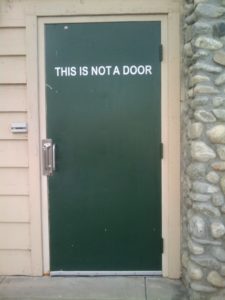
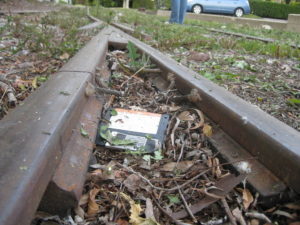
Photo of a door with a sign that says This Is Not a Door.So, remember this photo of a door labeled “This is not a door?” Last year, someone else sent a picture of the same door to FAIL Blog. Then a week ago, someone submitted mine to Friends of Irony, where Katie spotted it a few days later.

Here’s where things get interesting.

On both sites, people were absolutely convinced that it was “obviously” photoshopped.

*headdesk*

No, it’s real. It’s in a small business complex at the corner of Newport Ave. and Irvine Blvd. in Tustin, California. You can go there and look if you want. And of course there are the two photos taken from different angles.

The obvious conclusion is that people don’t really know how to tell whether a photo has been manipulated. At least on FAIL Blog, some of the doubters had reasons, even though they amounted to not understanding perspective.

I was tempted to post a comment linking to this XKCD strip (My hobby: insisting that real-life objects are photoshopped), but settled for requesting a photo credit instead.

Slowly but surely, my email cleanup continues.

After paring my inbox down to 100 items in mid-January, then 75 by the end of the month, I set my next goal of getting it down to 50 by the end of February. I just made it. I managed to hold in the 60-65 range for most of the month (after going through each day’s new mail), and decided to make an extra effort on the last day.

I’ve gotten a lot better at dealing with new stuff, whether answering it, filing it, taking an action elsewhere online or in the real world, or (in some cases) just deleting it. I’ve only got about 10 items from the last two months that I still need to act on in some way. The rest are older, mostly Flash-related info or to-do items. A lot of them are going to take longer since they involve research, or scanning, or writing.

So instead of aiming for 25 by the end of March, I’m going to aim for 30.

Who knows? By summer, I may actually have only new messages in my inbox!

Android and Me is reporting that all Android phones in the U.S. will get Android 2.1 updates — even the G1 — but that they may be missing some features and some models will need to be wiped as part of the installation.

That makes sense, because it would allow developers to reassign some of the space set aside for over-the-air updates and use it for a larger system instead — and maybe more space for apps.

The possibility that the G1 was headed for obsolescence before my 2-year contract was up didn’t bother me much at first, but I’ve watched as even Google has released high-profile apps that required Android 2. Sure, I doubt the hardware can handle Google Earth, and Buzz turned out to be a dud, but they’re signs that Android 1.6 isn’t going to cut it for much longer.

If it does require a wipe and re-install, I can deal with that. A lot of the key data is either synced with the cloud or stored on the SD card. With luck, T-Mobile and HTC will build a decent backup and restore into the process and I won’t have to reinstall all my apps, bookmarks, etc.

Update August 2010: This is looking less and less likely as time goes on.

»All pages site-wide with this tag