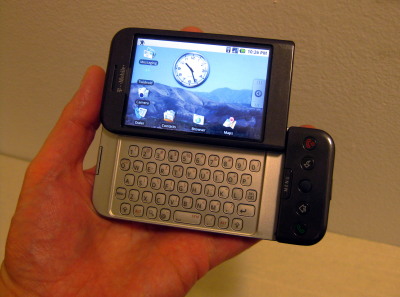
I have to confess: I’ve started seriously thinking about a netbook.

Not that I actually need a netbook. I’d only really end up using it for conventions that I’d want to post live (which would probably boil down to Comic-Con International), and I have the ability to do that using either my G1 or the laptop.

Long-time readers (all five of you 🙂 ) may remember that last year I agonized over upgrading my phone to something with real web capability until they announced wifi, and I just lugged the laptop around. Which worked fine, but it was heavy, especially the day I was also carrying around Comic Book Tattoo.

Of course, now I can use the G1 to post to my blog, or Twitter, or Facebook, or (almost) anywhere else even without wifi.

Except…

  • Typing on that tiny keyboard is slow. Not as slow as the onscreen keyboard, but still a lot slower than typing on a full-sized keyboard. Then again, netbook keyboards are also smaller than standard, so it might not be much of an improvement.
  • There’s no easy way to transfer photos from another camera. I can only think of two ways other than using a computer as an intermediary: use a Micro-SD card with adapter in the camera, or get a card reader that will clone data from an SD to a Micro-SD.

The camera issue shouldn’t bother me. Chances are I’d just end up doing what I did for WonderCon this year: post the occasional phone pic to Twitter and then upload the good photos to Flickr each evening. Just like I’d mostly be writing brief posts from the convention and detailed posts at the hotel.

Not my book, but the same page that she signed in mine.But then I remember the post I made on the Tori Amos signing last year. After the signing I was so hyped that I found a table, set up the laptop, banged out a blog post, hooked up the camera and added a couple of photos…and the post ended up getting linked on a major Tori fansite, producing a traffic spike so big that not only is the following day still this blog’s busiest day ever, but that post, even though traffic fell off over time, is the 8th most-viewed post on the site over the past year.

Still, the promise of another 15 minutes of blogfame isn’t enough to justify several hundred bucks. (Though the < $200 models that pop up on Woot from time to time have been tempting.) So I’m making an effort to practice typing with the G1, both the physical and on-screen keyboards. I’ve got Twidroid and I Tweet for posting to two Twitter accounts. I’ve got wpToGo to simplify blogging. I’ve got a plugin that will automatically liveblog using Twitter, which I still need to test.

It’s just a matter of making full use of the tools I have, rather than running after the latest cool toy.

Update: I posted this last night, but somehow it ended up backdated to the day I started it on May 20. I think wpToGo must have set a publishing date when I posted the draft. Yes, I started this post on my phone.
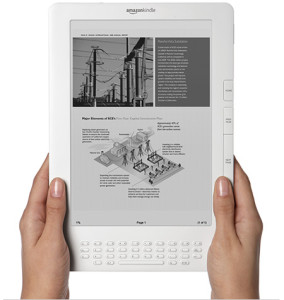
Kindle DXAmazon has announced the Kindle DX, a new version of their e-book reader with a 9.7-inch screen. Unless I’ve got my numbers wrong, that makes it larger than the standard manga page, though not quite as big as the standard American comic book page. And it’s only 1/3 of an inch thick, comparable to a typical trade paperback.

This could be the first e-reader device suitable for simply taking comics formatted for the printed page and transferring them to a tablet. No need to break it down and show one panel at a time like most iPhone or Android comics. No need to zoom and pan. Just transfer the whole page.

Sure, it’s only black and white, but there are plenty of comics produced in B&W, or reformatted for printing in cheap collections like Marvel Essentials or DC’s Showcase Presents series.

Imagine 30 years of Justice League of America or Spider-Man in the space of the latest trade.

The only drawback is the steep price tag: at $489, I’m not picking one up anytime soon.

(Reposted from Speed Force)

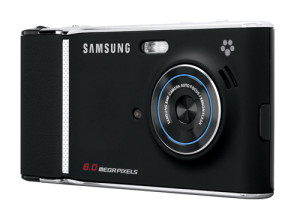
*sigh* I’m mostly happy with my G1, but I just read about the upcoming Samsung Memoir, which is the first phone I’ve seen that really takes the approach I’ve been looking for in terms of photo capability: instead of a phone that’s also a camera, it’s a camera that’s also a phone. Even the press release describes it as “designed to look and feel like a customer’s current point-and-shoot digital camera.”

Memoir cameraphone

Key specs:

  • 8 Megapixel camera
  • Flash
  • 16x Digital Zoom
  • Touch screen
  • 5 shooting modes
  • 3G connection
  • Connects to Flickr and other photo sharing sites
  • GPS navigation

It quotes Samsung’s Bill Ogle as saying, “This is the camera phone that will make people want to leave their digital camera at home” — which is exactly what I want from a camera phone.  It’s what I’ve wanted in a camera phone for years, and now that I finally bought a new phone, now someone’s actually selling one.

On top of that, it’s being offered by T-Mobile, so I’d be able to get it at an upgrade price — or could have if I hadn’t just upgraded to a G1 three months ago!

Of course, the press release leaves out a couple of critical items:

  • No mention of optical zoom
  • No mention of mobile web browsing capabilities
  • No mention of extensibility
  • No specs on how much memory it has, or what kind of card it takes (probably the usual micro-SD)
  • No Wifi

I’ve come to really appreciate the G1’s fully-capable web browser and the Android market for third-party apps, and I’d be reluctant to give that up. If the Memoir is a camera first and a phone second, the G1 is a handheld computer first. As for zoom, I have yet to see a digital zoom that was any better than just cropping an image in Photoshop.  And even with a 3G network, I’ve found it does take time to upload the G1’s 2-megapixel images. For 8 megapixels, I’d really want wi-fi.

Ah, well.  With phones, as with many things, you have to take the plunge sometime, or you’ll keep waiting for the next model, and the next, and the next, never actually make any change at all.

It’s been a little over a month since I upgraded to a T-Mobile G1. Overall I’ve been very happy with it. The Internet-related features are great, I’ve gotten used to how most of the functions work, and I’ve tried it out under various circumstances and played with a bunch of applications. The only problems I have, oddly enough, are with its functionality as a telephone. Continue reading

You may have noticed I’ve been looking for a smartphone for a while, and looking at the T-Mobile G1 more or less since it was announced. Well, I finally went for it. I was going through piles of papers on my desk and realized I had almost enough cashback bonus on one of my credit cards to cover the upgrade cost. And I was already seriously considering adding a data plan in order to put Opera Mini on my RAZR.

So I went down to the nearest T-Mobile store, asked about a couple of issues that hadn’t turned up in my previous research, and got the last one in stock. There was a couple there before me looking at them, but they said they weren’t ready to buy, just researching.

It took me about an hour to activate the phone, mainly because I didn’t have a data plan beforehand and it can take that long for a new plan to take effect. Once I did, I started playing around experimenting with it. (Unfortunately this meant a lot of the things I was going to do this afternoon…didn’t get done. Oh, well.)

Good Stuff:

  • I really like the keyboard. Even though I’m using my thumbs, just knowing where the keys are (and not having to do any kind of combos for letters & numbers) means that I can type much faster than I could on the RAZR. I’m already starting to get used to some of the secondary characters, like dashes and such.
  • Real web access! The web rendering is very nice. But then it’s WebKit, so it’s basically the same as Chrome or Safari, so that’s not a huge surprise.
  • Twitdroid (a Twitter app) and Quickpedia (an optimized front-end for Wikipedia) have impressed me so far.
  • There’s a tip calculator app called BistroMath. I had to pick it up or the name alone. (Sadly, it doesn’t seem to work as an FTL drive.)
  • I absolutely love being able to look things up online instantly!
  • Wi-Fi was easy to set up, including WPA2 security, so I can use our wireless network at home.
  • Wallpaper selection is very nice, with a built-in crop & resize function.
  • Plain old USB charging, which means I can still use the car charger I got for my last phone.
  • The WPhone alternate interface for the WordPress admin area, originally developed for the iPhone, is fantastic on the G1! (Too bad they aren’t developing it much anymore.)
  • The built-in calculator app includes limited scientific capabilities (trig, logs, roots, etc.)
  • My bank has an app that will look up the nearest ATMs or branches to where I am.
  • Scrolling by dragging the actual content instead of the scroll bar is surprisingly easy to get used to. Actually a lot of stuff about the UI is like that: awkward at first, but in just a few hours it becomes second nature.

Minor Issues:

  • Our apartment is right on the edge of a cell coverage area, so I haven’t had a chance to try it out on the 3G network yet. But that’s not the phone’s fault.
  • It took me a while to figure out how to sync transfer data via the USB cable, since they’ve changed the way it’s handled since the manual was printed. The manual lists it as a system setting, but it’s now an option that pops up in the notification area when you connect it to a computer.

Not So Good

  • The touch screen isn’t always responsive, but that may be because I haven’t removed the screen protector that ships with it. I wanted to pick one up that’s actually designed to be used before I pulled this one off. Update: After replacing the screen protector, it’s much more responsive.
  • The covers on the USB port and memory card feel really flimsy.
  • Battery life doesn’t seem to be terribly great. In fact, the clerk at the store suggested I charge it nightly.
  • I’ve only played with the camera a little but seems slow and isn’t great with artificial lighting.
  • Playing around with WordPress and Wikipedia shows how valuable it is to have a layout optimized for the small screen. The Android browser seems to rely entirely on zoom to handle large-screen layouts, and it would be nice to have something like Opera’s fit-to-width option. Update: It seems to ignore handheld stylesheets, which IIRC is true of the iPhone as well. When website providers try to help you with the small screen, maybe you should let them? *sigh* Need to see if it handles media queries, at least for screen size. Update 2: It does have a fit-to-width option, but I’m not entirely sure what it does, given that I keep running into layouts that end up scrolling horizontally.

Stuff I Have Not Tried But Intend To

  • Anything involving GPS. I’m inside right now and it can’t get a signal.
  • I don’t know how fast the download speed is over 3G. (Wifi is quite nice!) Update: 3G speed seems pretty decent, actually!
  • Map directions. But it’s Google Maps, and those are generally quite good.
  • I haven’t hooked up my Bluetooth earpiece yet. Update: Pretty simple. I just needed to remember how to put the headset in pairing mode.
  • I haven’t tried connecting to an open WiFi network/hotspot.
  • I need to do some more testing with the camera, see how it handles daylight, check out image quality, etc.
  • I haven’t really messed with voice dialing.
  • Email. It automatically links to your Gmail account, and has the ability to access POP and IMAP accounts, but I haven’t tried out any of the above yet.

Amazon KindleAmazon’s entire home page is currently taken up by the announcement of their new eBook reader, Kindle. At $400 I’m not going to rush out and buy one, but it looks like they’ve solved some of the main e-book problems: it’s small, light and wireless, and they even bring up the reading-in-bed issue in the intro.

The real question is going to be compatibility & openness: It’ll read plain text, HTML, Word, and a few other document formats (and they’re promoting its access to Wikipedia), so it should be possible for other stores to sell books for the device.

And what about the e-book offerings themselves? Will they be loaded down with draconian digital rights management like the Adobe ebooks of a few years ago, or are they following the model of Amazon’s MP3 store?* In a nice change, their music downloads are entirely DRM-free and they use it as a selling point. Edit: Per Andrea’s comments and further research, Kindle ebooks are locked down with DRM. No, thanks!

The name, however, makes me wonder how soon they’ll offer Fahrenheit 451.

* Amazon’s MP3 store is also surprisingly cheap. I replaced my old tapes of the original cast recordings of Les Misérables (Broadway) and Phantom Of The Opera for $9 each—they run upwards of $30 on CD.

»All pages site-wide with this tag