On Friday I reinstalled Red Hat 9 on my computer. On Saturday I figured out why I couldn’t build Dillo on the virtual Conectiva system (the only reason I tried to install the real thing). On Monday I made a remark on the Dillo mailing list that, after trashing the system trying to install Conectiva, “unless/until I can set up a spare system solely for trying things out, anything else… will run under User-Mode Linux.”

And that got me thinking.

A spare system wouldn’t need to be elaborate. I wouldn’t be playing games on it. I wouldn’t be doing graphics work on it. I wouldn’t even be doing web development, word processing, or checking my email. Most of the time it wouldn’t even be running – just when I wanted to try something new, or when a new release of Dillo came out and needed RPMs. And since I have a spare KVM switch, I’d only need to find space for the case, and wouldn’t need to worry about a monitor.

I’ve mentioned before that I’ve upgraded my computer piece-by-piece since 1994. Well, when you do that, you end up with a lot of spare parts left over. Sure, they’re older, slower, smaller, etc. than what you’ve got now, but if they worked when you took them out, they probably still work now. I’ve been meaning to go through all the boxes, cards, drives etc. and get rid of things I don’t need anymore, but I’d never gotten around to it. Well, on Monday I finally had motivation.

I went through looking for parts I could use to put together a spare, expendable system – one where it wouldn’t matter if the entire hard disk got wiped. I found three hard drives (two of them too small to be useful), several sticks of RAM, network and video cards, and a motherboard and a CPU that wouldn’t fit together. That left: a case, a CD-ROM, and either a CPU to go with the motherboard, or a motherboard to go with the CPU.

[A picture of Red Shirt] It turned out my boss was getting ready to throw out some old equipment, including a huge mega-tower with a 450 MHz K6-2. The motherboard I have used to hold a K6-2. (Where it is now, I have no idea – I don’t think it’s the one I fried, especially since the motherboard seems to work.) So now I had a processor. My parents had recently replaced an extremely flaky computer, so I got a CD-ROM from that. Then I went to Fry’s and picked up a $30 case and $13 floppy drive.

That’s right: I have just built a $43 computer.

Somewhere in this whole process, Katie came up with the name “Red Shirt Linux.” And while it’s mostly going to be SuSE, Conectiva, and Mandrake, the name fits.

Preliminary tryouts look promising: All the hardware works, I was able to see old data on the hard disk before I repartitioned it, I could boot tomsrtbt off of a floppy and mess around under that. I tried Conectiva first, and it failed, but I think I’ve got a bad install CD. (The UML system I built from it has network problems, and the copy I installed on Ghostwheel is what trashed my partition table, so it doesn’t surprise me that it had problems here.) I’ll run a thorough memory test overnight just to make sure, but it looks like I’ve got a PC I can mess around with without risking any data!
For several months I’ve been providing installable RPM packages for the Dillo web browser. Since many different distributions use RPM packages, I’ve been getting requests to add various Linux distributions. I started out just installing to extra partitions, but then I started building virtual systems with User-Mode Linux.

Well, people have been requesting RPMs for Conectiva, a distribution from Brazil and partner in UnitedLinux. I built a UML virtual system, but was never able to get Dillo to compile or to get the imitation network driver working. So, tonight I decided to install an actual copy.

With most Linux installers, you can choose where to create a new partition, and set it up to add existing ones to the system. This has worked fine with every version of Red Hat, Mandrake, and SuSE I have installed. The installer will create the new partition, leave the others alone, and mark them to be visible in the system you’ve installed.

Conectiva didn’t leave the existing partitions alone. Each partition I had marked was gone: my main OS partition (currently Red Hat 9), my home directory, and all my download and media files. Fortunately I had backups of the most critical files from last Saturday, and I was able to recover my entire home directory with Tomsrtbt and Parted‘s rescue function. And I don’t mind losing my main OS, since it’s not that hard to re-install it – all I need is the configuration, and I’ve got that backed up.

That leaves my entire download and media archive. I always figured, “I can just re-download all of this, right?” And most of it I can. Much of the rest either isn’t important, or hasn’t changed since the last backup (which I’ll admit was a long time ago), or can be recovered from CD, or can be re-scanned. The few photos that hadn’t made it into last week’s backup turned out to still be in a temporary folder on my website. Still, there are things that will be hard to find again, and probably some that will be impossible.

Just in case, I’ve got a recovery tool scanning the lost partitions in hopes that it will come up with something.

I’m not touching Conectiva again – or any other distribution I’m not already familiar with – until I get a spare system set up, or maybe spring for something like VMWare. And I’m seriously considering picking up some sort of backup solution that will hold more than a CD-RW, so I’ll be more inclined to save everything instead of picking and choosing what to put on a few discs.

Update 7:45am: I got the download/media partition back. The tool I ran overnight didn’t seem to find anything, but when I ran parted again this morning (after remembering that it was on PAUD, the Parted And Utilities Disk, not Tomsrtbt) it was able to find the partition.

So now all that’s missing is the primary OS (I’m running off of one of the “extra” installations right now), and I can reinstall that easily.

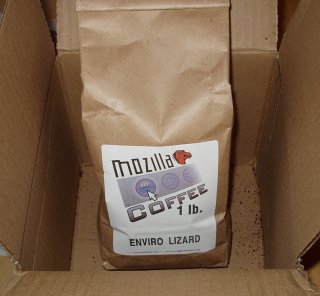
Yes, it’s real! Last week Katie remarked we were running low on coffee, and I remembered an article on MozillaZine a few weeks ago about RJ Tarpley’s Mozilla Coffee. I figured, what the heck, let’s order some. It’s a way to get coffee and support Mozilla at the same time.

An open box containing a bag of Mozilla Coffee.

We went out for a late lunch/early dinner today, and as we came up the stairs we noticed a note tucked into the doorframe. At first I figured UPS had left a “sorry we missed you” note, but when we got up to the landing, the doormat was propped up on a six inch tall box! (That and it turned out to be FedEx, but I digress.) “Hey, no one will notice if we hide this under the doormat!”

We haven’t tried it yet, but we’ll post the results of our taste-test once we do.

With the new crop of email viruses – the ones that fake the return address based on the same sources (address books, web caches, etc.) as the target list – you get a few interesting effects.

The first is that there is a good chance you’ll recieve many copies of the virus from the same source, with different return addresses. I saw this a lot in the recent Sobig outbreak: when our mail server deletes a virus, it logs the sending and receiving addresses and the IP of the connecting server. Some IP addresses would send hundreds of copies of the virus, all to the same recipient, all with different return addresses. So it would look like hundreds of people are sending you the same virus, but in reality, it’s just one infected machine.

The other is the “friend of a friend” effect. You may get the virus from someone who knows you (or has just visited your web page), but it looks like it came from someone who knows them (or someone else whose web page they visited). Two degrees of separation.

Yet another call of “I can’t retrieve email!” Always from Outlook users. If you use Eudora, Netscape – hell, even Outlook Express, you’ll get some sort of error message if it stops working. You can usually solve it by closing the program and starting it up again. But Outlook… Outlook will get into modes where it says it’s connecting, but it will never actually contact the server. Outlook will decide it needs to ask you for your password over and over again. And if you close Outlook, it’s not necessarily gone. Even “Exit and Log Off” doesn’t always do it. No, you have to reboot the %#@! computer. And if you’re lucky, you don’t have to track down the elusive Inbox Repair Tool (which might be in the Start menu. Maybe.)

I swear, if Outlook didn’t have the name Microsoft in front of it, no one would buy it. Maybe the latest version is better, but everything I’ve tried to use or troubleshoot is still just Schedule+ on steroids with email thrown in. Calling Outlook an email program is like calling a big clunky van a race car because you’ve replaced the engine. Outlook Express, for all its rampant security problems, is a much better mail program than its namesake.

Yecch!

Inspired by finding a list of Babylon 5 viruses earlier this week.

Harry Potter virus: Looks like the last file of a virus you just wiped out, until you try to erase it–then it wipes your drive.

Voldemort virus: You can’t get rid of it, only make it dormant. It can be reactivated by the Wormtail virus up to thirteen years later.

Dumbledore virus: Scares off all the other viruses but never seems to actually *do* anything.

Hermione virus: Fills up all available drive space with files of useless information.

Ron virus: Contains code, some of it buggy, from the author’s five previous viruses.

Continue reading →

ยปAll pages site-wide with this tag