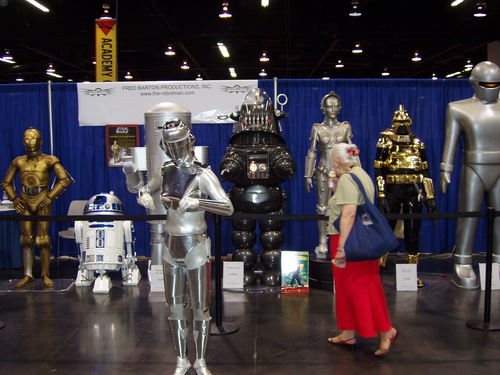
The cold that had been threatening me all last week finally hit on Friday morning, and I’ve spent the last four days in haze induced by a mixture of the cold and DayQuil. I actually went home early on Friday, dropped onto the couch, watched some Netflixed Justice League, and felt like I was staying up late when I went to bed at 9:00 or 9:30.

Out of sheer determination I dragged myself to Worldcon/L.A.con IV on Saturday. Katie stayed home since her main experiences with SF-themed cons were a few post-millennial Loscons, and Loscon was really going downhill at the time. Fortunately, this was more like I remember past Worldcons and earlier Loscons.

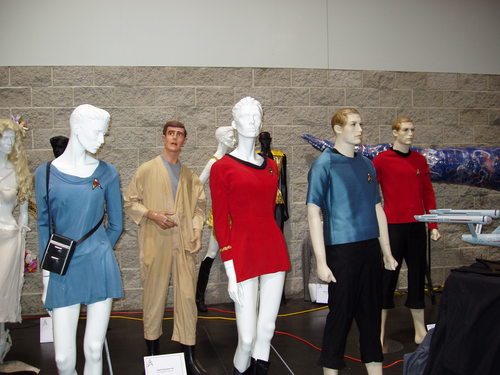
Classic Star Trek CostumesMy parents are SF fans, and they regularly brought us kids along with them to conventions. As far back as I can remember, it was a Thanksgiving Weekend tradition to visit family on Thursday, have Friday free, then go to Loscon on Saturday and Sunday. As for Worldcons, I’d been to three before: L.A.Con II in 1984, ConFrancisco(?) in 1993, and L.A.Con III in 1996. (Hey, if Worldcon is on the order of a 10-mile drive, you may as well take advantage of it.)

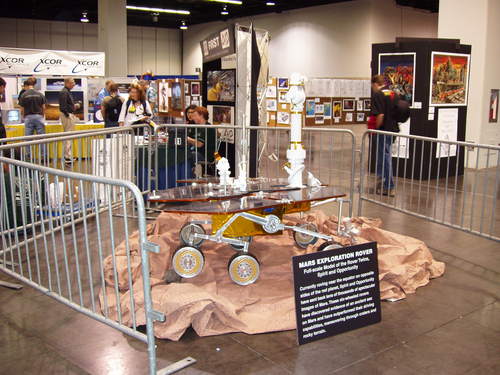
So I staggered through the dealer’s room, the art show, the exhibit hall with original Star Trek costumes, genre cars like the Batmobile and the DeLorean from Back to the Future, mock-ups of the lunar lander and rovers. I went to some panels on things like “What will future historians get wrong about our time,” the rise of theocracy, fixing things that go wrong in space, and what past sci-fi got wrong about the present.

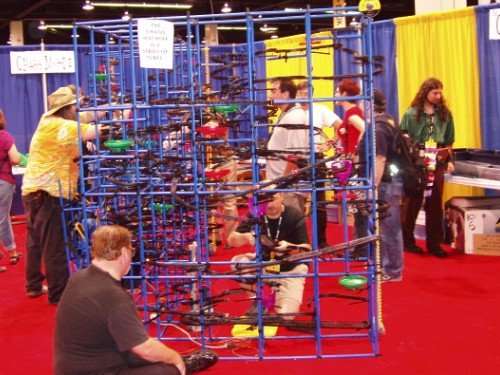
There was a group (IIRC, from a local college) with a bunch of remote-control robots. As I walked by, there was a college-aged group sitting and eating lunch from In-N-Out, one of whom had placed her hamburger (still mostly wrapped) on a little remote-control car, and was driving it around the floor, dodging obstacles (like feet). Then tragedy struck, and the burger fell off.

While I was in the art show, someone started up music nearby. The song sounded familiar, but I couldn’t place it until it reached the chorus. It was the “Make your own kind of music” song that was used in last year’s Lost season opener! The music turned out to be the accompaniment to a dueling artists bit.

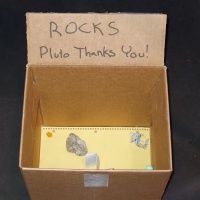
Cardboard box with rocks: Pluto thanks you!Someone had responded to Pluto’s demotion to “dwarf planet” and set up a display labeled Pluto Needs Rocks, all about a campaign to collect rocks and launch them at Pluto to increase its mass so it can clear out its orbit and get its status back as a planet. Yes, there was a collection box beneath the display. And yes, it had rocks in it.

I ended up running into my parents and some family friends, and we set up a time to meet and go to dinner. I figured I had enough time to drive home, pick up Katie, and come back, as long as we met outside the convention. Unfortunately, the freeway was backed up, and I realized there was no way we could have made it back in time. (One of the family friends had something to go to after dinner.) I called to cancel, and by the time I got home, I began to realize I wasn’t really in shape to continue driving. I realized later I’d been running on DayQuil and willpower, and my willpower had just run out for the day. So I ended up collapsing on the couch as soon as I walked in the door.

Current Mood: 🤒sick

I’ve been zombie-fied.

Comic-Con was fun, but exhausting. Add that to staying up too late last night and not being used to the heat…

You see, downtown San Diego was fairly nice all week. According to weather.com it only hit 83, which was uncomfortable when carrying a heavy backpack (or in Katie’s case, wearing a heavy pirate costume) in the sun, but quite comfortable in the shade or with a breeze. We got our first taste of what things have been like back home when we stopped for a bathroom break near the Irvine Spectrum area around sunset last night. It felt warmer at sunset in Irvine than it did in mid-afternoon in San Diego.

I don’t think the bedroom ever really cooled off last night, even with a fan running in the window all night.

Then after a night of “sleep” I got into work and I started hearing about temperatures hitting 108. It’s just… astonishing.

Anyway, I’m currently on twice my normal daily dose of coffee and I’m still spacing out and mistyping stuff.

(Originally posted on LiveJournal.)

Current Mood: 😴tired

There’s a lot of misinformation out there about various web browsers. Opera can/can’t do this. Firefox can/can’t do that. There’s only so much you can do to promote one product when you only know rumors or outdated facts about another.

Opera users: If someone told you that Firefox was better than Opera because it doesn’t have ads, you wouldn’t take them seriously. You’d know the ads have been gone since last year, and you’d wonder what else they have wrong.

Firefox users: If someone told you Opera was better than Firefox because Firefox won’t let you reorder tabs, you wouldn’t take them seriously. You’d know that Firefox 1.5 did just that, and you’d wonder what else they have wrong.

And neither of you will convince an IE fan that Opera is better because of tabs and a built-in search box because they’ll tell you that IE7 has both.

When you’re trying to convince someone that X is better than Y, and they know Y very well, you’d better know Y well enough not to make statements that the other person knows are false. When you do, you’ll lose credibility, and the rest of your argument — the part you do know well — will suffer for it. (I suspect a lot of software flame wars get started this way!)

So here’s my suggestion: If you want to promote Opera, go and download Firefox 1.5. If you want to promote Firefox, go and download the Opera 9 beta. Either way, try out the IE7 beta (if your Windows version will run it) or fire up Safari (if you’re on a Mac). Mess around with them enough that you’re familiar with how they work, what you can do with them, and how they handle your favorite web pages. That way the next time you face an IE fan (to the extent that IE has fans), or a Firefox fan, or an Opera fan, or a Safari fan, you’ll be armed with accurate information.

As for the post title — I don’t think it’s necessary for the major browsers to be enemies. I think there’s plenty of room for cordial competition rather than a cutthroat struggle. But “Know Your Enemy” is a better attention-getter than “Familiarize yourself with the competition.” 😉

*This post originally appeared in two slightly different forms on my blog Confessions of a Web Developer at the My Opera community and on my Spread Firefox blog.

Posting an Opera button on your website or blog is a great way to encourage people to try out the browser — but what if the visitor already uses Opera? It shows solidarity, but what if you could show them something else, something that is new to them?

You might want to replace your regular Opera banner with an ad for Opera Mini. Or show them another graphic of your own design. Or maybe not even a graphic, maybe post some sort of message, like “Opera spoken here!” or “Welcome, Opera visitors!”

It’s relatively simple to do this in PHP, or ASP, or some other server-side script…but sometimes you have to stick with static HTML. Well, client-side JavaScript can replace chunks of your page, and here’s how to do it.

1. Put the following script in a file called operalinks.js:

function replaceOperaLink(linkID) {

if(linkNode=document.getElementById(linkID)) {

if ( 0 <= navigator.userAgent.indexOf('Opera') ) {

var newButton=document.createElement('span');

newButton.innerHTML = '<a href="http://www.opera.com/">Glad to see you're using Opera!</a>';

var parentNode=linkNode.parentNode;

parentNode.replaceChild(newButton,linkNode);

}

}

}

For the innerHTML section, you can plug in a new link and banner, or a special message, or anything you want. (Just make sure that you put a backslash () in front of any apostrophes you use.)

2. Put a unique ID in the tag for your regular Opera button. Use the outermost tag that you want to replace. For example, let’s start it off with this:

<a id="OpLink" href="http://www.opera.com">Download Opera!</a>

3. Load the script in your document’s <head> section:

<script type="text/javascript" src="operalinks.js">

4. Call the function in the body onload event using the ID you chose in step 2:

<body onload="replaceOperaLink('OpLink')">

When the page loads, the script will check the visitor’s browser. If it’s Opera, it’ll replace the banner with whatever message you chose in step 1. It’s compatible with both HTML and XHTML, and you don’t need to worry about using <noscript> tags to make sure the banner still shows up for people with JavaScript disabled.

*This post originally appeared on Confessions of a Web Developer, my blog at the My Opera community.

It’s kind of redundant to post a “Get Firefox!” banner to someone already using Firefox, but it’s useful to show them an upgrade banner if they’re on an old version.  It’s also useful to show Firefox users a banner for Spread Firefox.

This can be done easily with PHP or other server-side scripting languages, but sometimes you have to use static HTML files.  That’s where client-side scripting becomes necessary.  Last month I posted some sample code that used document.write, which doesn’t work with XHTML.  (On top of that, the <noscript> blocks I used ended up causing validation errors because of their location!)

I’ve redone everything with DOM scripting, which will work with either HTML 4 or XHTML 1.0.

1. Put the following in a file called sfxlinks.js:

function replaceFirefoxLink(linkID) {
   if(linkNode=document.getElementById(linkID)) {
      var newLink=document.createElement('a');
      var newImg=document.createElement('img');
      var change=0;
      if ( 0 <= navigator.userAgent.indexOf('Firefox/0') ||
         0 <= navigator.userAgent.indexOf('Firefox/1.0') ) {
         change=1;
         newLink.setAttribute('href','YOUR_UPGRADE_LINK');
         newImg.setAttribute('alt','Upgrade to Firefox 1.5!');
         newImg.setAttribute('title','Upgrade to Firefox 1.5!');
         newImg.setAttribute('src','PATH_TO_BANNER');
      } else if (0 <= navigator.userAgent.indexOf('Firefox')) {
         change=1;
         newLink.setAttribute('href','YOUR_REFERRAL_LINK');
         newImg.setAttribute('alt','Spread Firefox!');
         newImg.setAttribute('title','Spread Firefox!');
         newImg.setAttribute('src','PATH_TO_BANNER');
      }
      if(change) {
         newLink.appendChild(newImg);
         var parentNode=linkNode.parentNode;
         parentNode.replaceChild(newLink,linkNode);
      }
   }
}

2. Use your regular Spread Firefox affiliate link and add a unique ID — let’s use id="FxLink" as an example — to the <a> tag.

3. Load the script in your document’s <head> section:
  <script type="text/javascript" src="sfxlinks.js">

4. Call the function in the body onload event using the ID you chose in step 2:
  <body onload="replaceFirefoxLink('FxLink')">

When the  page loads, the script will check the visitor’s browser to see if it’s an old version of Firefox or a current version of Firefox.  If it’s an old version, it’ll replace your standard button with your upgrade button.  If it’s a current version, it’ll replace it with a Spread Firefox button with your referral link.  Otherwise, it leaves the button alone.

This has a lot of advantages over the old version, including XHTML compatibility, no need for <noscript> blocks, easier validation, and it still degrades gracefully (if JS is unavailable or old, it leaves your normal button in place).

You can see it in action on my website, Flash: Those Who Ride the Lightning.

Originally posted on my Spread Firefox blog.

Woke up early (well, early for me) so we could get out and hit the polls before work. I was amazed that there was only one person in line ahead of us. Not only that, but there was only one line, not three or four broken up by last name.

Well, it’s a mid-term election. Plus it’s morning, and the last few years we’ve gone in the evening. (There was one year that I voted at lunch, but I had to drive Katie to the poll after work anyway, so it’s easier if we just both go at the same time.) It must have been last year that the line was so long that we got there at 6:30 or 7:00 and didn’t finish until after the polls “closed” — meaning they didn’t let anyone else get into line. (Sensibly, they allowed anyone who was in line by 8:00 to vote.) And there were a lot of people waiting behind us!

Now on to programming for a few hours until Microsoft kicks their patches out the door.

Current Music: Gettin’ Ready Rag (in head)

OK, so you want a web anyone can use, whether they’ve picked Windows, Macintosh, Linux, or whatever came on their cell phone or PDA. What can you do? Here are some ideas:

Web Users

Try an alternative browser. Use it exclusively for several days. Get used to what it can do, and how it differs from Internet Explorer or the browser you’ve been using.

Better yet, try two. If you already use Firefox, try Opera. If you already use Opera, try Firefox or Chrome. You can always switch back if you like the other one better. The goal is to see what’s out there.

If you find a web browser you like, tell your friends and family. Get them to try it out, or give them a demo.

If you really like the browser, and would like to spread awareness, consider joining a promotional group like Firefox Affiliates or Choose Opera.

Bloggers and Content Providers

Write about your favorite web browser. Encourage your visitors to try it out. Post links or buttons pointing to the download site.

If you agree with the Alternative Browser Alliance‘s goals, feel free to link to us.

Web Developers

Base your design on web standards whenever possible. Take a look at sites like the CSS Zen Garden and A List Apart for ideas. The Mozilla Developer Center and Opera Developer Community are also good resources.

Validate your code. Learn which rules are safe to break. Where you have to use proprietary features, use graceful degradation so that other browsers at least get a usable experience. Some tools for validation include:

Try not to make assumptions based on browser detection, which is often wrong by the time the next version of a program rolls around. Where you have to check, detect capabilities, not browsers.

Start a collection of web browsers. When designing a site, check the layout with as many browsers as you can early in the process. Check critical parts of the site before you go live. Sites like Browsershots or BrowserStack can help you with browsers and platforms you don’t actually have.

Do your development on Chrome or Firefox. Both have extensive tools to help you test and debug your websites.

Conclusion

These are just suggestions. You can do as much or as little as you want, as much or as little as you can!

This article originally appeared on the Alternative Browser Alliance in 2005. This is the latest version before I retooled the site a decade later.

»All pages site-wide with this tag