I’ve been meaning to write a post about email newsletters that still assume you’re reading on a desktop and send out layouts that rely on a wide screen size and end up with tiny 2-point type on a mobile phone — you know, where most people read their email these days.

Then I stumbled on this usability article by Jakob Nielsen.

From 2012.

It pretty much covers what I would have said, and more. But a decade on, I still get email I can’t read without moving to a bigger screen.

The Time Before Tables

The funny thing is that HTML, by design, already adjusts to different sized displays, windows and terminals. In the very early days, you couldn’t make it not be responsive unless you added a block of pre-formatted text.

Once HTML picked up a little more rendering capability (tables, images and image maps), you had people designing websites who were accustomed to fixed-size media, and the paradigm stuck.

— Build your layout in Photoshop at 800×600, then slice it up into clickable pieces and reassemble the whole thing on a page!
— Wait, now we can aim for 1024×168!
— Oh, hey, we have widescreen now!
— Huh? What do you mean the window isn’t always fullscreen?
— Phones now? Ugh, I’ve gotta make a totally different website!

And so on.

Responsive Styling

These days you can apply relative sizes to everything, and tweak the layout based on the logical screen size instead of physical pixels. (Shout-out to high-definition displays here!) Modern HTML+CSS is amazingly improved in flexibility, and if you plan it right, you can often just rearrange the same page for screens from small cell phone size up to those widescreen monitors. Obviously this depends on what kind of site or application you’re building.

But for email, especially for newsletters, where reading the text is the main point, it should be an obvious choice!

Expanded from a thread on Wandering.shop.
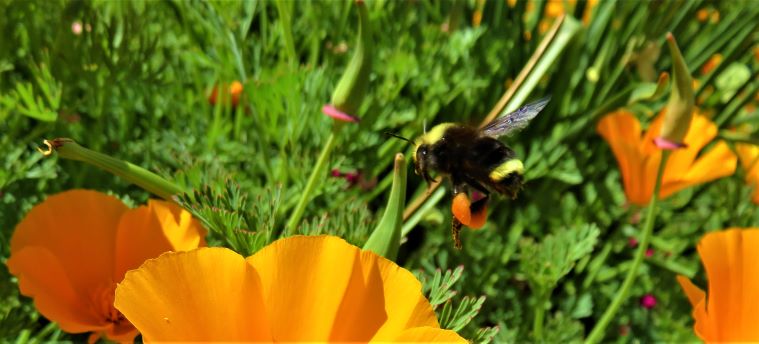
A yellow-faced bumblebee above an orange poppy, a clump of orange pollen stuck to its legs.

This is kind of hilarious.

Conservation groups asked California to protect four species of native bumblebees. The agriculture industry objected on the grounds that the state’s endangered species law doesn’t cover insects. But the state fish and game code, in trying to cover all its bases defining marine life, defines a fish as “a wild fish, mollusk, crustacean, invertebrate, amphibian, or part, spawn, or ovum of any of those animals.”

So technically, bumblebees, being invertebrates, are eligible for protection as fish.

The state supreme court ruled in favor, because that’s technically what the law says. The judge pointed out that the legislature “is in a position to make whatever statutory amendments it may regard as necessary or useful” to resolve any ambiguities…and specifically stated that the ruling does not mean that the court actually believe bumblebees are fish!

Photo of a Yellow-Faced Bumblebee I saw at the South Coast Botanic Gardens a while back. It’s not one of the four species being petitioned for protection. But I wanted to use one of my own photos for illustration, rather than use the one from the newspaper. Though it’s amusing that of the four endangered species they went with a photo of — I kid you not — Bombus crotchii, a.k.a. Crotch’s Bumblebee. Named after George Robert Crotch.

Expanded from a post on Wandering.shop.

Also: Darwinian Honeybees

On a more serious note, hobbyist beekeepers are starting to use a strategy called Darwinian beekeeping to fend off colony collapse disorder.

Essentially you try to mimic how honeybees would live in the wild instead of trying to pack in as many monocultured hives as you can. Build smaller hives and spread them out, so if one gets infested the parasites or diseases don’t spread as easily to the next. Capture a wild swarm of honeybees, which, unlike mail-order bees bred to maximize honey production, have evolved defenses against the invasive mites that have been attacking developing bees. Keep the hives away from plants you’re going to be using pesticides on.

The causes of CCD are still unclear, but there seem to be multiple factors that contribute to it — and these strategies mitigate several of them. And a lower honey yield in exchange for colonies that survive longer seems like it would be worth the trade-off.

Interesting read on building “microforests”: If you don’t have enough room for actual rewilding, plant a small plot of multilevel native plants and trees in a park, school yard, or even your own back yard — especially in urban areas. Anywhere you can fit an oak (or equivalent), some shorter trees, some bushes and some ground cover. Create a thicket that will support small birds, insects and other animals, and just let it grow.

Horticulturist Katherine Pakradouni is developing a Los Angeles-focused how-to guide at LAMicroforests.com. Update (November): The site is live!

It makes me wish I actually had a back yard!

Phishers: Hi, we’re your bank, please click on this attachment for important information.

Security experts: Never click on an unexpected attachment in an email even if you think you know who it’s from. It’s likely to be malware or a scam to steal your login credentials.

Actual banks: Hi, we’re your bank, please click on this attachment for important information. 🤦‍♂️

Seriously, I HATE these systems. The way they keep phishing and malware techniques believable — and have for years! — is worse than any supposed security advantage in not just using email. Half the time the info isn’t any more sensitive than a receipt would be. Or heck, even just “There’s a new message in your account, please log in to see it and use your own bookmarks to get there.” That’s actually more secure!

:sigh:

It’s really too bad all the schemes to add end-to-end security to email over the years have been either too cumbersome to take off for general usage or vendor-specific.

While I’m griping about Instagram, why the heck are the detailed notification preferences split between the app and the system notification UI?

That’s terrible design.

Well, if it’s intended for usability, anyway.

If your goal is to make people see more notifications, though… 🙄

Yeah.

IMO there are two sensible ways to handle granular push notification preferences:

  1. Use the system’s per-app settings for all of it. (Tusky does this, even putting your per-account preferences in the system UI.)
  2. Use the app’s settings for all of it, and let the system just be an on/off toggle for what you’ve chosen in the app (like it was before Android even had UI for it).

Either way, everything’s in the same spot so you know you haven’t missed anything you want to turn off. Or anything you want to turn on, for that matter.

One of the things I like about Mastodon and Pixelfed and the rest of the Fediverse vs commercial social networks is that they don’t TRY TO GET MY ATTENTION every time I open the page or app and offer ALL THESE THINGS I SHOULD BE LOOKING AT that might be relevant to what it thinks my interests are, to make sure I stay online and don’t stay away again for sooooo long! (Even if it’s only been a few days.)

Seriously:

  • I opened Instagram for the first time in at least a month and I was bombarded with more ads and recommendations than photos from people I was actually following.
  • I opened an alt profile in Twitter yesterday to post something off the cuff, and all the trending topics, pushing new features, etc. were like walking onto the Las Vegas Strip when all you want is a sandwich.

Never mind the normal “You haven’t logged onto Twitter in a few hours, here’s all the stuff you missed, and look, people are posting new stuff while you’re catching up, you’d better keep scrolling! What, you switched to another app for five seconds? Here, I’ll scroll it for you!”

Compared to Mastodon just showing you the latest that you’re actually following. And if you want to fill in what you missed, that’s up to you.

(There’s also the posting culture. On Twitter, people are used to discussing DOOOOOM all the time, so even curating your timeline isn’t always enough if you want to follow people talking, I don’t know, astronomy or whatever, because they’re also talking doom. And the algorithm reinforces it at both ends in a vicious circle, encouraging doom-posting and encouraging doom-scrolling.)

Choice Complaints

None of these complaints is inherent to the structure or functionality of Twitter, Instagram, Facebook etc. They’re deliberate UI design choices to optimize for the company’s targets. A third party client could bypass it all (which of course is why they basically don’t allow those anymore).

Similarly, Mastodon and Pixelfed and so on could implement UI like this, but they don’t. The project goals aren’t engagement at all costs. And each instance can have its own goals.

Or someone could add an ATTENTION-GRABBING EXPERIENCE on top of the code and launch their own service. And those of us on other instances, running different software, wouldn’t be affected. Unless the site injected ads into the ActivityPub streams going out to people following its users, in which case I imagine a lot of instances would block them really quickly.

Or they could write an app that adds extra popups and keep-scrolling incentives to the phone experience!

I’m not sure many people would consider that an improvement.

Then again, people do use Yahoo mail. 🤷‍♂️

Expanded from Mastodon.

»All pages site-wide with this tag